
Samsung Galaxy Z Fold 8: A Revived Foldable Experience
I’ve spent considerable time evaluating the best foldable phones, yet none have convinced me to make the leap to a main handset – until now. The Samsung Galaxy Z Fold 8, with its distinctly “passport-shaped” design, has
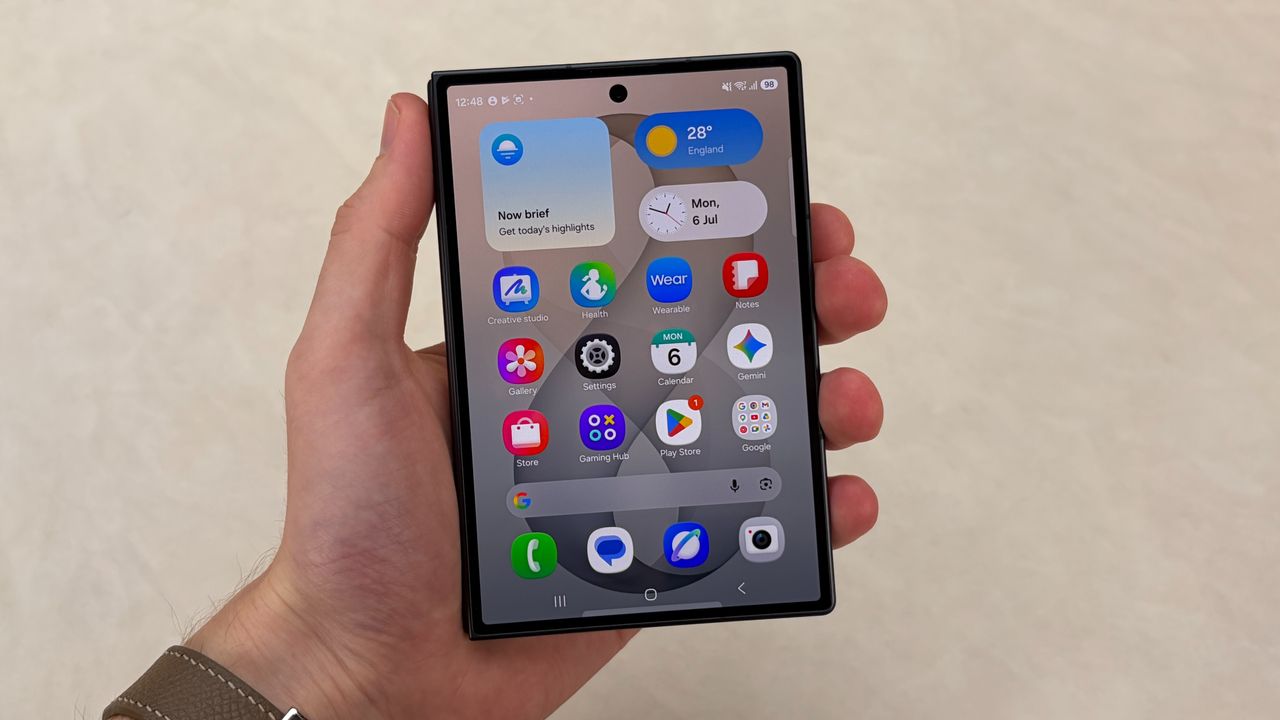
I’ve spent considerable time evaluating the best foldable phones, yet none have convinced me to make the leap to a main handset – until now. The Samsung Galaxy Z Fold 8, with its distinctly “passport-shaped” design, has genuinely rekindled my interest in the foldable form factor. It’s a compelling shift from the elongated, narrow external displays and near-square internal screens we’ve grown accustomed to.
Quick Verdict
The Samsung Galaxy Z Fold 8 delivers a much-needed design overhaul, offering significantly improved ergonomics for one-handed use when closed and a vastly superior media consumption experience when unfolded. While it retains the premium display technology of its pricier sibling, the Z Fold 8 Ultra, its reconfigured aspect ratios make it a more versatile and consumer-friendly device, especially for those who prioritize video, social media, and reading.
Design Reimagined: Shorter, Wider, and Wiser
Previous book-style foldables, including the Samsung Galaxy Z Fold 7 and the new Galaxy Z Fold 8 Ultra, featured a tall and narrow cover screen that often felt awkward for everyday smartphone tasks. The internal display, while large, was almost square, leading to significant black bars when watching widescreen video content. The Z Fold 8 fundamentally addresses these issues with its new dimensions.
Measuring in with a 5.5-inch cover display and a 7.6-inch main display, the Z Fold 8 adopts a shorter and wider profile. When closed, its 3:4 portrait aspect ratio on the cover screen means your thumb can comfortably reach the top of the display, making one-handed navigation genuinely practical. This is a noticeable improvement for tasks like scrolling through apps or quickly checking notifications. In landscape, the cover display maintains a 4:3 ratio. Unfolding the device reveals a 10:16 aspect ratio on the main screen, specifically optimized for widescreen content. This thoughtful re-engineering makes it feel less like a bulky novelty and more like a refined, dual-purpose device. It’s a ‘Galaxy Z Fold 7.5’ in spirit, focusing on practical usability.
The Media Consumption Advantage
For many users, a smartphone is primarily a media consumption device – a portable window for videos, social media feeds, and e-books. This is where the Galaxy Z Fold 8 truly shines and diverges from its predecessors. My main grievance with earlier Folds was the inefficient use of screen real estate for video playback due to the nearly square inner display. Watching a YouTube video on a Z Fold 7 or Z Fold 8 Ultra meant enduring substantial black letterboxing above and below the content.
The Z Fold 8's 10:16 unfolded display dramatically reduces these unsightly bars. While they aren't entirely eliminated, the difference is stark and immediately noticeable, providing a much more immersive viewing experience. Even the outer display, with its new aspect ratios, offers a significantly better platform for casual video viewing compared to the Ultra's more restrictive 21:9 cover screen. Samsung itself acknowledges this shift, stating they’ve identified a segment of consumers who are “very heavy on media” and will find the Z Fold 8’s form factor ideal for videos, games, and reading. The company has even dubbed its unfolded screen size as “the new standard for viewing content,” a sentiment echoed by rumors of a similarly sized foldable iPhone from Apple.
Core Specifications
Beyond its transformative design, the Galaxy Z Fold 8 doesn't skimp on core display technology. Both its 5.5-inch cover screen and 7.6-inch main display boast a fluid 120Hz refresh rate, ensuring smooth scrolling and responsive interactions. Furthermore, both screens achieve an impressive 3,000-nit peak brightness, offering excellent visibility even in bright outdoor conditions. These display specifications are on par with the premium Galaxy Z Fold 8 Ultra, ensuring that users get a top-tier visual experience regardless of their preferred orientation or display choice.
Pros and Cons
Pros:
- Improved Ergonomics: The shorter, wider design significantly enhances one-handed usability of the cover screen.
- Superior Media Viewing: Optimized aspect ratios drastically reduce letterboxing for videos, both on the cover and main displays.
- Better for Scrolling and Social Media: The more conventional screen proportions make daily scrolling and social app usage more comfortable.
- High-Quality Displays: Both screens feature a 120Hz refresh rate and 3,000-nit peak brightness for a premium visual experience.
- Revived Foldable Appeal: Addresses key pain points of previous foldable designs, making the technology more accessible and practical for a wider audience.
Cons:
- Lingering Letterboxing: While significantly reduced, some black bars are still visible when viewing widescreen content on the unfolded display.
- Still a Niche Product: Despite improvements, foldable phones remain a premium category, and some may prefer traditional slab phones for simplicity.
Comparison Table: Z Fold 8 vs. Z Fold 8 Ultra
| Feature | Samsung Galaxy Z Fold 8 | Samsung Galaxy Z Fold 8 Ultra |
|---|---|---|
| Cover Display Size | 5.5 inches | (Similar to Z Fold 7) |
| Inner Display Size | 7.6 inches | (Similar to Z Fold 7) |
| Cover Display Aspect | 3:4 (portrait), 4:3 (landscape) | 21:9 |
| Inner Display Aspect | 10:16 | 1.11:1 (nearly square) |
| Primary Use Case | Media consumption, one-handed ease, reading, gaming | Productivity, spreadsheets, multitasking |
| Video Viewing | Significantly less letterboxing | Substantial letterboxing |
| Refresh Rate | 120Hz | 120Hz |
| Peak Brightness | 3,000 nits | 3,000 nits |
Buying Recommendation
The Samsung Galaxy Z Fold 8 stands out as a strong recommendation for anyone who has been intrigued by foldable technology but put off by the awkward aspect ratios of previous iterations. If your phone usage primarily involves watching videos, scrolling through social media, casual gaming, or reading e-books, the Z Fold 8’s optimized displays will offer a vastly superior experience. It strikes a better balance between a traditional smartphone and a tablet, making it a more practical daily driver for media-centric users. If, however, your primary use case involves heavy multitasking with spreadsheets and productivity apps, and you don’t mind the pronounced letterboxing for video, the Z Fold 8 Ultra (or even previous Fold models) might still appeal to your specific workflow. For the vast majority, the Z Fold 8’s design evolution is a game-changer, making foldables a genuinely more attractive proposition.
FAQ
Q: How does the Z Fold 8 improve over previous Fold models for general use?
A: The Z Fold 8 features a shorter, wider design with a 3:4 aspect ratio on its cover display, making it much easier to use one-handed. Its unfolded inner screen (10:16 aspect ratio) is also optimized for widescreen content, significantly improving the video-watching and general media consumption experience compared to the squarer inner displays of past Folds.
Q: Is the Z Fold 8 good for productivity?
A: While the Z Fold 8 still offers a large internal screen, its new aspect ratio of 10:16 is optimized for widescreen content and media consumption rather than the more square 1.11:1 aspect ratio found in models like the Z Fold 8 Ultra, which is better suited for spreadsheets and intensive multitasking.
Q: What are the key display specifications?
A: Both the cover and main displays on the Samsung Galaxy Z Fold 8 feature a smooth 120Hz refresh rate and boast an impressive 3,000-nit peak brightness for excellent clarity and visibility.
Related articles

Nothing CMF Clip Pro Review: Open-Ear Awareness at a Steal
The Nothing CMF Clip Pro offers a unique open-ear listening experience, designed for situational awareness and comfort. Now $30 off at $69, it's an appealing option for those seeking spacious sound without sealing off the world.

Apple's Touchscreen MacBook Pro: A Long-Awaited Touch
The Verdict Apple's rumored touchscreen MacBook Pro represents a long-overdue evolution, promising to blend the convenience of direct screen interaction with the powerful macOS laptop experience. While not an essential

CMF Watch 3 Pro: Affordable Style Meets Solid Performance
CMF Watch 3 Pro: Affordable Style Meets Solid Performance In the crowded market of smartwatches, finding a device that balances features, design, and affordability can be a challenge. Enter the CMF Watch 3 Pro, a

Love Island Australia S8 Guide: Navigating the Stream, Mostly Free
Love Island Australia Season 8 Streaming Guide: Navigating the Digital Waters Verdict: TechRadar's guide to watching Love Island Australia Season 8 is a generally useful, if somewhat navigationally challenged, resource

Sculpture Re-creates Lycurgus Cup Effect: A Glimmering Triumph of Art
The University of Sheffield successfully re-creates the 1,600-year-old dichroic glass recipe of the Lycurgus Cup. A new sculpture by artist Elliott Walker displays the stunning green-to-red optical effect, blending ancient tech with modern art. A significant scientific and artistic achievement.

OpenAI's Deepfake Defense: A Timely, Imperfect Solution
Quick Verdict OpenAI's new safeguard against political deepfakes, by forcing politically sensitive image generations into a cartoon style, is a practical and timely step to protect election integrity. While not a