
MSI MPG X870E Carbon Max Wifi Review: Modest Refresh, Strong Core
Quick Verdict MSI's MPG X870E Carbon Max Wifi is a competent AM5 motherboard, offering a premium experience with robust features for enthusiasts and high-end system builders. While it introduces the OC Engine chip and a
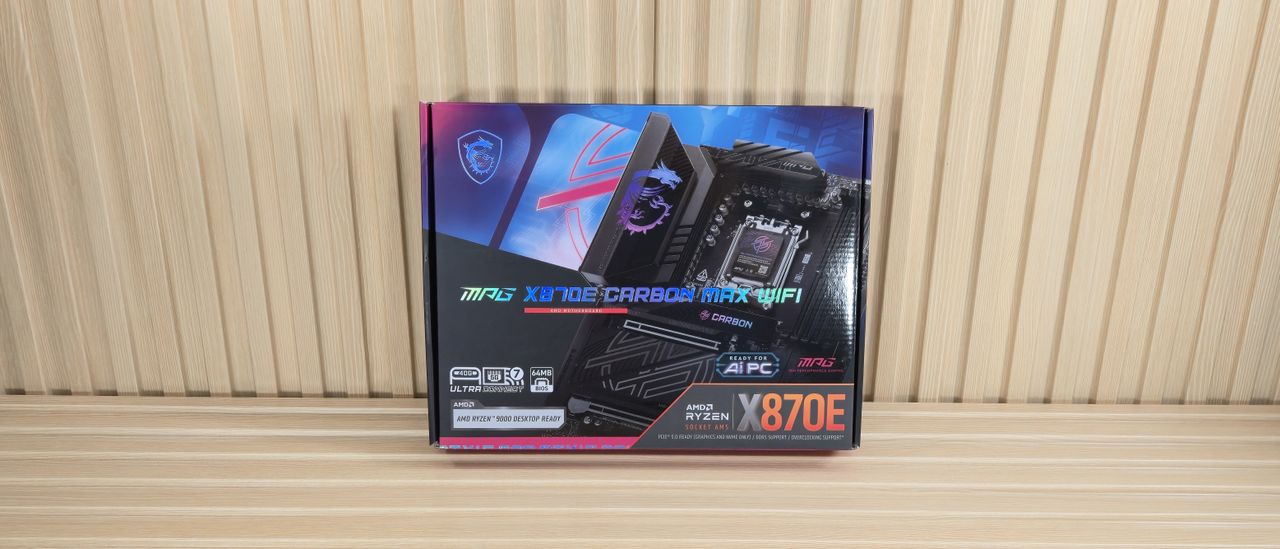
Quick Verdict
MSI's MPG X870E Carbon Max Wifi is a competent AM5 motherboard, offering a premium experience with robust features for enthusiasts and high-end system builders. While it introduces the OC Engine chip and a larger 64MB BIOS, alongside a subtle aesthetic update, it remains largely consistent with its predecessor. At its $499 price point, it provides strong performance and extensive connectivity, but potential buyers should weigh whether the new overclocking capabilities justify the cost over alternative options.
Introduction: Familiar DNA, Subtle Enhancements
The X870E Carbon Max Wifi enters the market as a refresh of MSI's well-regarded X870E Carbon Wifi. This updated iteration, priced at $499, focuses on refining the already solid foundation rather than reinventing it. Key changes include the integration of MSI's OC Engine chip, a larger 64MB BIOS for enhanced compatibility and feature support, and a minor facelift to its carbon-black aesthetic. While many refreshes tend to be incremental, the Carbon Max Wifi aims to provide a competitive offering in the premium mid-range AM5 motherboard segment, especially for those keen on pushing their hardware's limits.
Key Features and Specifications Overview
Designed for AMD's AM5 processors, the X870E Carbon Max Wifi adheres to the ATX form factor. It boasts a formidable 21-phase voltage regulator, with 18 phases dedicated to Vcore, utilizing 110A MOSFETs, signaling serious power delivery capabilities. For connectivity, it's well-equipped with Wi-Fi 7, dual Ethernet (5 GbE and 2.5 GbE), and an impressive 13 USB ports on the rear I/O, including two 40 Gbps USB4 Type-C ports that also support DisplayPort v1.4. Storage is ample with four M.2 sockets (two PCIe 5.0 x4 and two PCIe 4.0 x4) and four SATA 6 Gbps ports, all supporting RAID configurations. The board also features four DDR5 DIMM slots, officially supporting speeds up to DDR5-9000 (OC) for APUs or DDR5-8400+ MT/s for desktop CPUs, alongside a modern Realtek ALC4080 audio codec.
Design and Build Quality: Stealthy Aesthetics and Robust Engineering
MSI maintains the distinctive carbon-black aesthetic that the Carbon series is known for. The X870E Carbon Max Wifi features a server-grade 8-layer PCB, contributing to its stability and signal integrity. A reflective Mystic Light RGB accent, in the form of the MSI dragon, adorns the VRM heatsink, with additional RGB on the large M.2 Shields Frozr II heatsink for the top PCIe 5.0 M.2 slot, subtly displaying the Carbon branding. The board’s aesthetic is refined, with minor accent line changes on the heatsinks compared to its predecessor.
Physical construction is robust, highlighted by oversized VRM heatsinks interconnected by a direct-touch heat pipe, ensuring efficient heat dissipation even under heavy loads. MSI's PinSafe design on the board's rear eliminates exposed solder points, preventing accidental pokes or snags during installation. The inclusion of convenient EZ DIY features like PCIe Release and EZ M.2 clips simplifies component installation and removal, enhancing the user experience.
Performance and User Experience
In testing, the X870E Carbon Max Wifi delivered average overall performance with the latest BIOS and AGESA updates. While it showed slightly slower results in Handbrake encoding, it performed admirably across a range of applications, including rendering, office tasks, and gaming. Our test system, featuring a Ryzen 9 9900X and an RTX 4080, operated without issues, indicating the board's capability to support high-end hardware. Beyond raw performance, the board offers ‘AI’ functionalities designed to assist with overclocking, networking, and cooling, and even NPU boosts for compatible CPUs, aiming to simplify system optimization for users.
Connectivity and Storage Highlights
The rear I/O panel is a connectivity powerhouse, offering a total of 13 USB ports: nine USB 3.2 Gen 2 (10 Gbps) and two USB4 (40 Gbps) Type-C ports, alongside an HDMI output. Three physical buttons – BIOS Flashback, Clear CMOS, and a programmable Smart button – add significant convenience. Dual Ethernet ports (5 GbE and 2.5 GbE) and Wi-Fi 7 with quick-connect capability ensure high-speed networking.
Storage options are extensive, with four M.2 sockets. The top two M.2_1/2 sockets offer PCIe 5.0 x4 bandwidth directly from the CPU, while M.2_3/4/5 (the fifth is on the back) are chipset-fed PCIe 4.0 x4. A notable consideration is bandwidth sharing: the M.2_2 socket shares lanes with the two USB4 Type-C ports. Populating M.2_2 will reduce its speed to x2 and likewise for the USB4 ports. For full USB4 bandwidth, M.2_2 should remain unpopulated. Additionally, four SATA 6 Gbps ports cater to traditional storage needs.
Internal headers provide further expansion, including a USB 3.2 Gen 2x2 (20 Gbps) Type-C header with 27W charging, multiple USB 3.2 Gen 1 and USB 2.0 headers, and seven 4-pin fan headers (supporting both PWM and DC modes) with generous power outputs, plus RGB headers for lighting control.
Power Delivery and Overclocking Prowess
The X870E Carbon Max Wifi's power delivery system is a significant strength, featuring a 21-phase design with 18 phases dedicated to the Vcore. It utilizes a Renesas RAA229620 controller and 18 Renesas R2209004 110A SPS MOSFETs. This robust solution mirrors the capabilities found in even more expensive boards like the X870E Ace Max, ensuring it can effortlessly handle flagship AMD Ryzen processors, including future high-core count X3D variants, even with aggressive manual overclocking or PBO (Precision Boost Overdrive) enabled. The inclusion of the new OC Engine chip specifically enhances overclocking potential, making this board particularly appealing to enthusiasts.
Value and Buying Recommendation
At $499, the MSI MPG X870E Carbon Max Wifi is positioned as a premium offering. It brings a compelling package of high-end features, robust power delivery, extensive connectivity, and specific enhancements for overclocking. The board's performance is solid, and its design is aesthetically pleasing. However, its primary drawback is its relative similarity to the original Carbon model, meaning the updates are modest rather than transformative. The source content also mentions that "better value alternatives exist" in the market, especially if the dedicated OC Engine chip isn't a critical feature for your specific use case.
Recommendation: This motherboard is an excellent choice for serious PC builders and overclockers who want to extract maximum performance from their AM5 processor and appreciate the fine-tuned control offered by the OC Engine. If you are building a top-tier system and intend to utilize advanced overclocking features, the Carbon Max Wifi presents a strong contender. However, if your needs are more mainstream or you prioritize cost savings, exploring other AM5 motherboards, potentially even the original Carbon, might offer similar core functionality at a more attractive price point. Consider the value of the OC Engine and the larger BIOS for your specific requirements before committing to this premium option.
FAQ
Q: Is the MSI X870E Carbon Max Wifi a significant upgrade over the original X870E Carbon Wifi?
A: The "Max" version introduces the OC Engine chip and a larger 64MB BIOS, along with a minor aesthetic refresh. While these are improvements, the core feature set and overall functionality remain largely similar to the original Carbon Wifi.
Q: Is this motherboard suitable for high-end AMD Ryzen processors and overclocking?
A: Absolutely. With its robust 21-phase power delivery (18x 110A Vcore) and the specific addition of the OC Engine chip, the Carbon Max Wifi is exceptionally well-equipped to handle flagship Ryzen CPUs and extensive overclocking, whether manual or using PBO.
Q: Are there any compromises regarding M.2 storage or USB connectivity?
A: The board offers four M.2 sockets, with two supporting PCIe 5.0. However, the M.2_2 socket shares bandwidth with the two USB4 Type-C ports. If M.2_2 is used, both its speed and the USB4 ports' bandwidth will drop to x2. For full USB4 bandwidth, it's recommended to leave the M.2_2 socket unpopulated.
Related articles

Ars Technica's Rocket Report: Your Essential Space Industry Briefing
Quick Verdict Ars Technica's Rocket Report, presented by veteran space reporter Stephen Clark, offers an invaluable and meticulously organized weekly (or similar frequency, implied by "Edition 9.15") digest of the most

Apple iPhone Duo: A Daring Debut with Notable Compromises
Apple's highly anticipated iPhone Duo, priced at $2,000, has gone on pre-order. While hailed as "Apple's most exciting device in a decade" for its innovative foldable design and immersive display, it comes with significant drawbacks like the absence of FaceID and a premium camera.

KDE Plasma 6.8: A Future-Focused 30th Anniversary Update
Quick Verdict KDE Plasma 6.8, arriving as the "30th Anniversary Edition," is a pivotal release that decisively pushes the desktop environment into the future. With a definitive farewell to native X11 sessions and a

Ephemeral PR Preview Environments on GKE: A Deep Dive
Every development team eventually grapples with the limitations of shared staging environments. The familiar scenario: multiple features deployed simultaneously, database migrations clashing, and the phrase "it works on
Galaxy Watch One UI 9 Beta: Promising Progress, But Patience Needed
Galaxy Watch 8, Watch Ultra, and Watch 7 are receiving a new One UI 9 Watch beta build with bug fixes and a security patch. Active development signals progress, but a stable release date remains elusive.

Enterprise AI Beyond Chatbots: A Vision for Actionable Intelligence
Quick Verdict: Redefining Enterprise AI's Potential TechRadar Pro's opinion piece, "What it takes to move enterprise AI beyond the chatbot," delivers a refreshingly honest and vital perspective on the current state and