
Sonos Surround Trick: Flexible Home Theater Gets Real
As an experienced tech reviewer and a long-time admirer of Sonos' innovative approach to home audio, I've filled my living spaces with their speakers. From dedicated home theater setups to stereo pairs for music, the
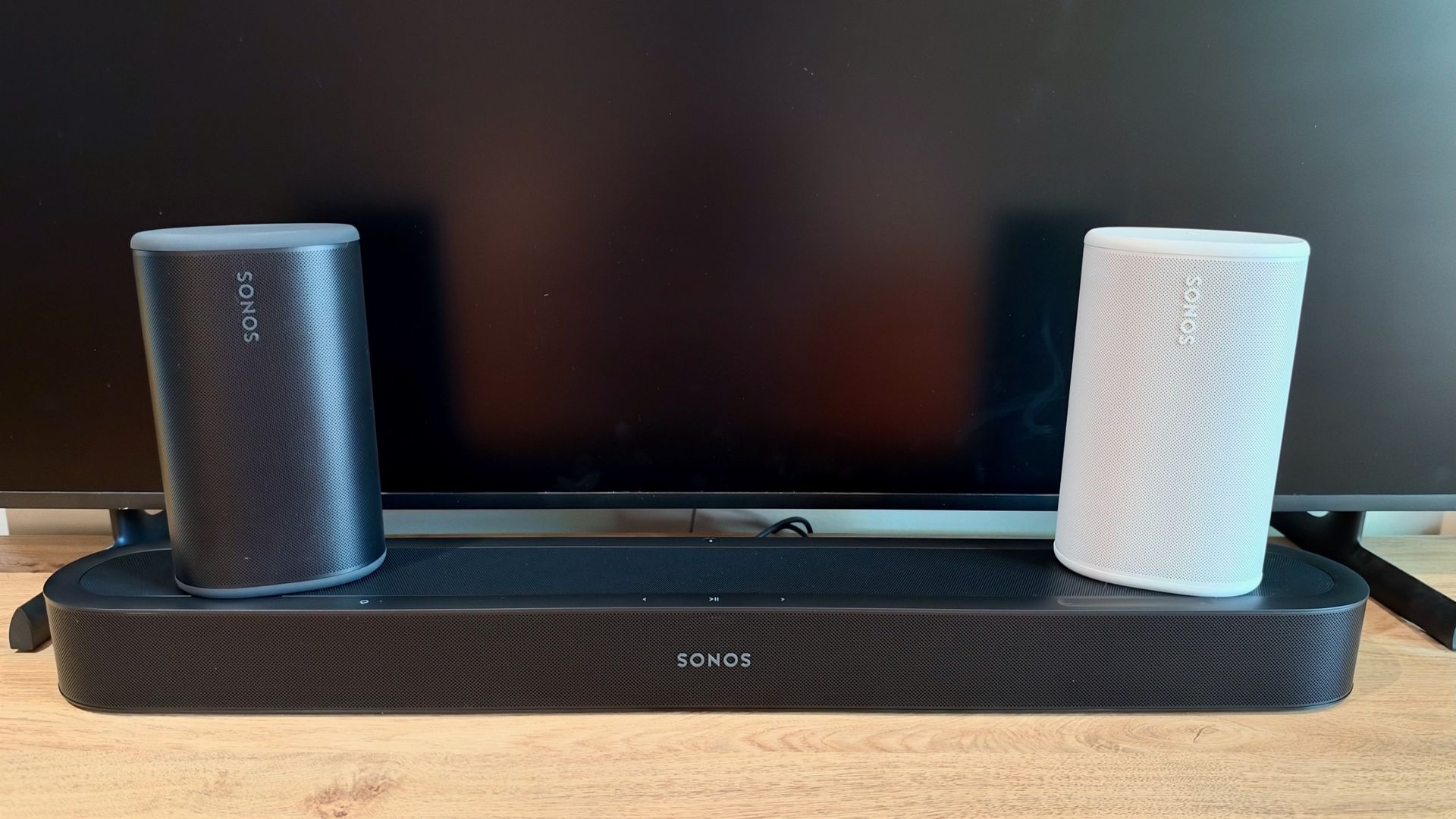
As an experienced tech reviewer and a long-time admirer of Sonos' innovative approach to home audio, I've filled my living spaces with their speakers. From dedicated home theater setups to stereo pairs for music, the ability to effortlessly group speakers and stream audio throughout my home has always been a major draw. However, I’ve often felt there was untapped potential for even greater versatility. So, when Sonos unveiled the Beam Ultra soundbar and, more significantly, a new software feature allowing their portable Play speakers to serve as temporary rear surrounds, my interest was immediately piqued. I've previously championed the Play as potentially "the only speaker you really need," given its impressive performance both at home and on the go. This new integration, powered by the Sonos27 operating system, promised to extend that versatility to the home theater experience.
The Promise of Dynamic Surround Sound
Traditional home theater setups often demand a permanent commitment of speakers to specific roles, limiting their utility. Sonos' new feature seeks to break this mold. The core idea is brilliantly simple: a pair of Play speakers, usually dedicated to music playback elsewhere, can seamlessly join a Sonos soundbar (like the new Beam Ultra, or even existing Arc, Arc Ultra, and Beam Gen 2 models) to create an immersive surround sound experience. The true magic, however, lies in their ability to then disconnect, be carried to another room for independent use, and automatically rejoin the home theater system upon their return.
This dynamic flexibility is achieved through some rather clever underlying technology. Each Play speaker incorporates an accelerometer that detects when it’s picked up and moved. Simultaneously, Sonos Positioning Technology utilizes near-ultrasonic signals, which are then picked up by the soundbar's integrated microphones, to precisely determine whether the speakers are in the same room and their exact spatial orientation. This sophisticated system can even automatically assign each Play speaker its correct role as the left or right rear surround, eliminating the need for manual configuration through the app. In theory, this is the home theater flexibility I’ve always dreamed of.
My Hands-On Experience: A Tale of Two Tests
I paired a Beam Ultra with two Play speakers in my bedroom to put this promise to the test. Even without the new trick, the combination of the Beam Ultra and dedicated rear surrounds delivers a genuinely expansive sound, vastly superior to any TV's built-in audio, while remaining discreet enough for a bedroom setting. The Beam Ultra itself impressed with its compact size and powerful Dolby Atmos delivery, as I noted in an earlier listen.
My initial attempt to experience the dynamic switching, however, hit a snag. I picked up one of the Play speakers and moved it from the bedroom to the living room, fully expecting it to transition to an independent music speaker. Instead, it continued to reproduce audio from the bedroom's home theater system, with the connection becoming intermittent and the sound cutting in and out. This wasn't the seamless experience I'd hoped for. Ultimately, I had to resort to manually tapping 'Stop Using Surrounds' within the Sonos app. When I returned the speaker to its original spot, it frustratingly didn't automatically reconnect, again requiring a manual 'Start Using Surrounds' command.
Undeterred, I decided to give the system another chance a short while later. This second attempt was a revelation. I repeated the process, moving the same Play speaker to the living room. After a brief few seconds, an audible tone confirmed its successful disconnection from the home theater setup. Both Play speakers – the one I moved and the one still in the bedroom – then appeared as standalone devices in my AirPlay settings, ready for independent music streaming. Returning the speaker to its original position was equally smooth. A gentle, breathing white light indicated that the speaker was actively determining its position relative to the soundbar. This was followed by the same reassuring audible tone, confirming its successful reintegration as the rear-left surround. Crucially, I didn't need to touch the app at all.
That’s the moment the true genius of Sonos’ new approach truly clicked for me. It transformed the Plays from fixed components of a home theater system into versatile, multi-purpose devices that can adapt to my needs throughout the day. This level of flexibility is genuinely transformative.
Pros and Cons: An Honest Assessment
Pros:
- Unprecedented Flexibility: Transforms portable speakers into dynamic components of a home theater system, then back to standalone units.
- Seamless Switching (Once Calibrated): After an initial hiccup, the automatic disconnection and reconnection worked flawlessly.
- Automatic Speaker Assignment: No need to manually designate left or right surrounds; the system intelligently handles it.
- Enhanced Value for Play Speakers: Adds significant utility to existing or new Sonos Play speakers, making them even more versatile.
- Significant Home Theater Improvement: Elevates the audio experience with compatible Sonos soundbars like the Beam Ultra, delivering an expansive sound that greatly surpasses built-in TV speakers.
Cons:
- Potential for Initial Glitches: As experienced, the first attempt at automatic switching didn't work perfectly, requiring manual intervention.
- Compatibility Nuance: While compatible, the compact Play speakers might be a slight acoustic mismatch for the larger, more powerful Arc or Arc Ultra soundbars, though they pair well with the Beam models.
- Ecosystem Lock-in: This advanced flexibility is exclusive to the Sonos ecosystem, meaning you're investing in their specific hardware and software.
Embracing Flexibility Over Fixed Setups
When considering alternatives, it's less about directly comparable products and more about contrasting approaches to home theater. The traditional alternative involves purchasing dedicated, non-portable rear surround speakers that are permanently fixed in position. This provides a stable, always-on surround sound, but at the cost of the speakers being single-purpose. Sonos' innovation here is the alternative to that rigid setup, offering a fluid experience where speakers can serve multiple functions across different rooms. It's a fundamental shift, moving from static components to a dynamic, adaptable audio environment.
This isn't merely a minor update; it's a strategic move that significantly enhances the value proposition of Sonos' portable speakers and their home theater soundbars. The concept of "plug and Play" takes on a whole new meaning when your rear surrounds can become your kitchen music speakers and then effortlessly return to their cinematic duties.
Buying Recommendation
If you're already invested in the Sonos ecosystem, or are considering building one, this new feature makes the Sonos Play speakers an even more compelling purchase. Combining them with a Sonos Beam Ultra (or a Beam Gen 2) offers a superb, flexible home theater experience. While the initial setup might require a bit of patience, the long-term benefits of having truly multi-purpose speakers are undeniable. This is a genuinely clever trick that delivers on its promise of flexibility, making it a highly recommended upgrade or starting point for a versatile home audio setup.
Current Pricing (as of review):
- Sonos Beam Ultra: ~$699
- Sonos Play: ~$299
FAQ
Q: What Sonos soundbars are compatible with the Play speakers as surrounds?
A: The Sonos Play speakers can be used as rear surrounds with the Sonos Arc, Arc Ultra, Beam (Gen 2), and Beam Ultra soundbars.
Q: How does the system know when a Play speaker has been moved and where to place it?
A: Each Play speaker contains an accelerometer to detect when it's picked up and moved. Sonos Positioning Technology then uses near-ultrasonic signals, captured by the soundbar's microphones, to determine if the speaker is in the same room and its precise location, automatically assigning it as the left or right surround.
Q: Is this dynamic surround feature reliable?
A: The reviewer experienced an initial instance where manual intervention was necessary. However, subsequent testing demonstrated seamless automatic disconnection and reconnection, suggesting the feature is reliable once the system has settled or if a brief initial calibration is needed.
Related articles

Nothing CMF Clip Pro Review: Open-Ear Awareness at a Steal
The Nothing CMF Clip Pro offers a unique open-ear listening experience, designed for situational awareness and comfort. Now $30 off at $69, it's an appealing option for those seeking spacious sound without sealing off the world.

Your Guide to LG's 115-inch QNED evo TV: Features, Gaming & Price
Welcome to an exciting exploration of LG's latest innovation in home entertainment: the colossal 115-inch QNED evo AI Mini LED TV. This guide is designed to walk you through everything you need to know about this

Apple's Touchscreen MacBook Pro: A Long-Awaited Touch
The Verdict Apple's rumored touchscreen MacBook Pro represents a long-overdue evolution, promising to blend the convenience of direct screen interaction with the powerful macOS laptop experience. While not an essential

CMF Watch 3 Pro: Affordable Style Meets Solid Performance
CMF Watch 3 Pro: Affordable Style Meets Solid Performance In the crowded market of smartwatches, finding a device that balances features, design, and affordability can be a challenge. Enter the CMF Watch 3 Pro, a

Love Island Australia S8 Guide: Navigating the Stream, Mostly Free
Love Island Australia Season 8 Streaming Guide: Navigating the Digital Waters Verdict: TechRadar's guide to watching Love Island Australia Season 8 is a generally useful, if somewhat navigationally challenged, resource

Sculpture Re-creates Lycurgus Cup Effect: A Glimmering Triumph of Art
The University of Sheffield successfully re-creates the 1,600-year-old dichroic glass recipe of the Lycurgus Cup. A new sculpture by artist Elliott Walker displays the stunning green-to-red optical effect, blending ancient tech with modern art. A significant scientific and artistic achievement.