Google Health AI Coach: Smart Assistant or Annoying Nudge
Google Health's AI Coach, a Gemini-powered feature within Premium, offers personalized health guidance but can be repetitive. Users now have easy controls to toggle it off for a break or privacy.
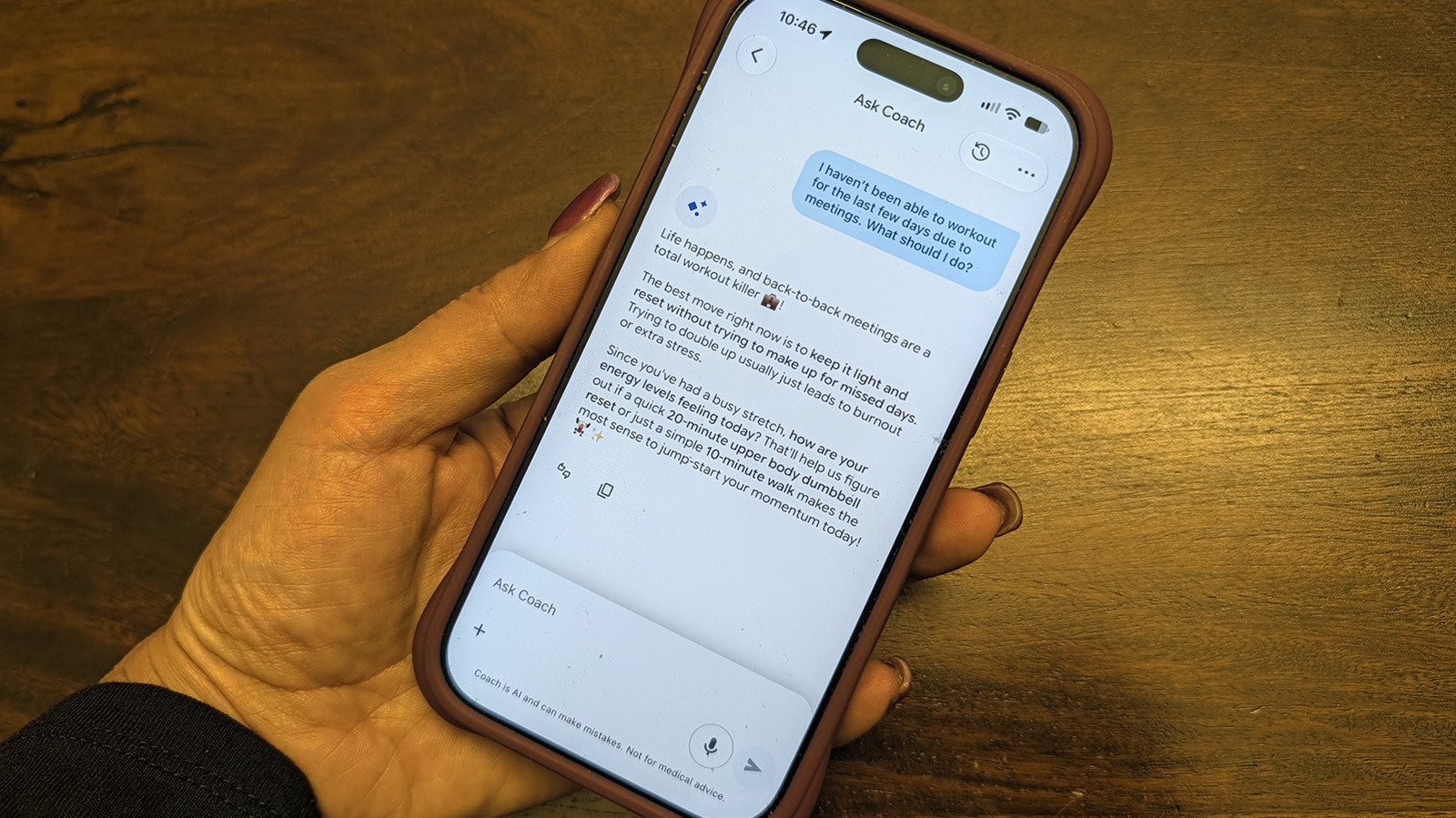
The landscape of personal health technology is constantly evolving, with artificial intelligence increasingly playing a role in how we monitor and manage our wellness. Google Health's AI Coach, a standout feature within the Google Health Premium subscription, is a prime example of this integration. Powered by Google's Gemini AI, this coach promises personalized insights and interactive guidance. But does it deliver genuinely helpful support, or is it just another digital voice adding to the noise? This review delves into the functionality, user experience, and crucial controls for this AI assistant, helping you decide if it’s a valuable companion or a feature best left dormant.
What is Google Health's AI Coach?
Google Health's AI Coach is an advanced feature exclusively available to subscribers of Google Health Premium. Unlike the free tier, Premium users get access to this Gemini-powered AI designed to act as a personal health and wellness guide. Its core function is to provide personalized guidance, recommendations, and summaries based on your health data. It’s integrated deeply enough that you can directly "Ask Coach" questions, engaging in a conversational chat about various health and wellness topics. It also offers practical utilities like snapping photos of meals for logging protein, carbs, and fat intake, and learning from your interactions to tailor its advice. However, it's important to remember that while it can help adjust workouts or suggest routines, it explicitly states that it does not provide medical advice.
User Experience: A Double-Edged Sword
The experience with Google Health's AI Coach is, like many AI assistants, a mixed bag.
The Upside: Personalized and Practical Support
When it works well, the AI Coach can be genuinely beneficial. Its personalization engine learns from your lifestyle the more you engage with it, aiming to provide more relevant suggestions over time. For instance, the source mentions using it to log specific weights lifted during a strength training session, or receiving guidance on how to modify workouts around a shoulder injury (again, not medical advice, but practical adjustments). The ability to quickly log meals via a photo is a convenient feature for those tracking nutrition. The personalized summaries can also be a good way to get an overview of your progress. This level of tailored interaction is one of its strongest selling points, offering a sense of having a dedicated assistant without the human cost.
The Downside: Intrusiveness and Repetition
However, the "constant advice" can quickly become a significant drawback. Users might find the coach to be intrusive or repetitive, delivering the same suggestions daily, even for activities already being performed. The example given is getting prompts for a 30-minute strength session and a light walk, even when these are already part of a routine. This can lead to users ignoring the insights more often than reading them, negating the very purpose of the coach. Beyond the annoyance, concerns about privacy might also lead users to want to disable such a feature, especially one that processes personal health data. Furthermore, during periods of illness, injury, or simply a "personal funk," constant prompts, even well-intentioned, can be counterproductive or even frustrating.
Taking Control: How to Silence Your AI Coach
Recognizing the need for user agency, Google released an update in August 2026 that makes managing the AI Coach much easier. You no longer have to cancel your entire Google Health Premium subscription just to get a break from the AI. The process is straightforward, allowing you to temporarily or permanently set aside the Gemini-powered coach while retaining access to other Premium benefits like personalized sleep summaries, advanced sleep tracking, Sleep Score, Health Guardian, cycle predictions, and nutrition tracking.
Steps to Turn Off AI Coach:
- Open the Google Health app while subscribed to Premium.
- Tap your profile photo in the top right corner.
- Select "Your data in Google Health."
- Scroll down to "Feature privacy controls" and tap "Manage feature privacy controls."
- Select "Google Health Coach" and then the "Turn off" button.
Alternatively, a quicker path is:
- Tap your profile photo.
- Go to "Google Health settings."
- Select "Coaching" and toggle the feature off from there.
For those who only find the messages bothersome but want to keep the underlying functionality, you can adjust "Coach messages on Today" from "Standard" to "No Coach insights," which will only show basic updates. If notifications are the primary issue, navigate to "profile photo > Google Health settings > Push notifications," and simply turn "Coaching" notifications off. This allows you to retain the coach's presence without constant pings.
Bringing the Coach Back:
Should you wish to re-engage the AI Coach, it's also simple. Unlike turning it off, you won't use the same privacy settings menu. Instead, you'll need to:
- Tap the still visible "Ask Coach" button at the bottom right of the app.
- Select "Unlock Coach" to initiate the restoration process. Importantly, turning the coach off does not delete any of your previous health data.
Value Proposition: Premium Without the Coach?
For many, the AI Coach is one of the key differentiators for Google Health Premium. If you decide to keep it off for an extended period, it's worth evaluating if the remaining Premium features justify the subscription cost. These include valuable tools like personalized sleep summaries, advanced sleep tracking algorithms, a Sleep Score, Health Guardian for tracking noticeable changes in wellness, cycle predictions, and general nutrition tracking. If these features alone provide sufficient value for your needs, then keeping Premium and disabling the coach is a viable option. However, if the coach was your primary reason for subscribing, and you find yourself disabling it, you might be "better off cancelling Premium and sticking with the base-level free Google Health app" if the other upgrades aren't essential to your routine.
Buying Recommendation
Google Health's AI Coach presents itself as a powerful, personalized health assistant for Premium subscribers. Its ability to offer tailored guidance, track workouts, and log meals quickly can be genuinely helpful for those committed to actively engaging with it and refining its settings. However, its tendency towards repetitiveness and potential for intrusiveness means it's not for everyone.
The August 2026 update, which introduced easy toggle controls, is a significant win for user choice. This flexibility means you don't have to commit fully or abandon your Premium subscription if the coach isn't working for you at a particular time.
Recommendation: If you are a Google Health Premium subscriber interested in leveraging AI for personalized health insights, meal tracking, and workout adjustments, and you are willing to customize its settings (especially notifications) to your preference, the AI Coach is worth exploring. The ability to easily turn it off and on makes it a low-risk feature to try. If, however, you value privacy above all else, find constant digital advice overwhelming, or primarily use Google Health for other Premium features, then disabling the AI Coach is a sensible choice that doesn't sacrifice your entire Premium experience. For those considering Premium solely for the AI Coach, be prepared to manage its advice to prevent it from becoming a nuisance.
FAQ
Q: Can I use Google Health's AI Coach without a Google Health Premium subscription? A: No, the AI Coach is exclusively a feature of Google Health Premium and is not available with the free Google Health tier.
Q: If I turn off the AI Coach, will my previous health data be deleted? A: No, turning off the AI Coach feature will not delete any of your previously recorded health data within Google Health. You can reactivate the coach at any time.
Q: Does Google Health's AI Coach provide medical advice? A: No, the AI Coach does not provide medical advice. It offers personalized guidance, recommendations, and assistance with logging, but it is not a substitute for professional medical consultation.
Related articles
Get the Honeywell Smart Color Thermostat for $80 and Start Saving on
Learn to get and install the Honeywell Home Wi-Fi Smart Color Thermostat for just $80, a 55% saving, and start reducing your utility bills by leveraging its Energy Star certified features and smart home integration.

Gemini Memory Summary: Essential User Control
Google Gemini, like many advanced AI systems, aims to personalize your interactions by remembering details about you. While this can enhance your experience, it also brings up natural privacy concerns regarding what

Android XR Smartglasses: Display-less Specs Redefine AI Wearables
For years, I've approached smartglasses without integrated displays with a healthy dose of skepticism. My thinking was simple: if I can't see augmented reality overlays or discrete notifications right in my line of

CNET's Wordle #1972 Guide: A Solid Daily Puzzle Companion
Quick Verdict CNET's daily offering of Wordle hints, answers, and strategic help for puzzle #1972 is a robust and reliable resource for both casual players and those seeking to refine their game. While the concept of a

Pixel's Android Auto Gemini AI: A Proactive Leap Rivaling Siri
Pixel's Android Auto Gemini Intelligence: A Proactive Leap Rivaling Siri Quick Verdict: The latest Android Auto update brings Google's advanced Gemini Intelligence to eligible Pixel users, delivering a profoundly

CNET's NYT Connections Guide: A Daily Puzzle Solver's Companion
Quick Verdict CNET's daily guide for NYT Connections delivers exactly what it promises: timely, well-structured hints and answers for the popular word puzzle. With clear, progressively helpful clues and immediate