
Google Fitbit Edge Review: Your Anti-Smartwatch Fitness Sweet Spot
Learn if the Google Fitbit Edge is the right fitness tracker for you, balancing core health features with a simplified experience. Discover its design, advanced tracking, and software insights to make an informed decision.
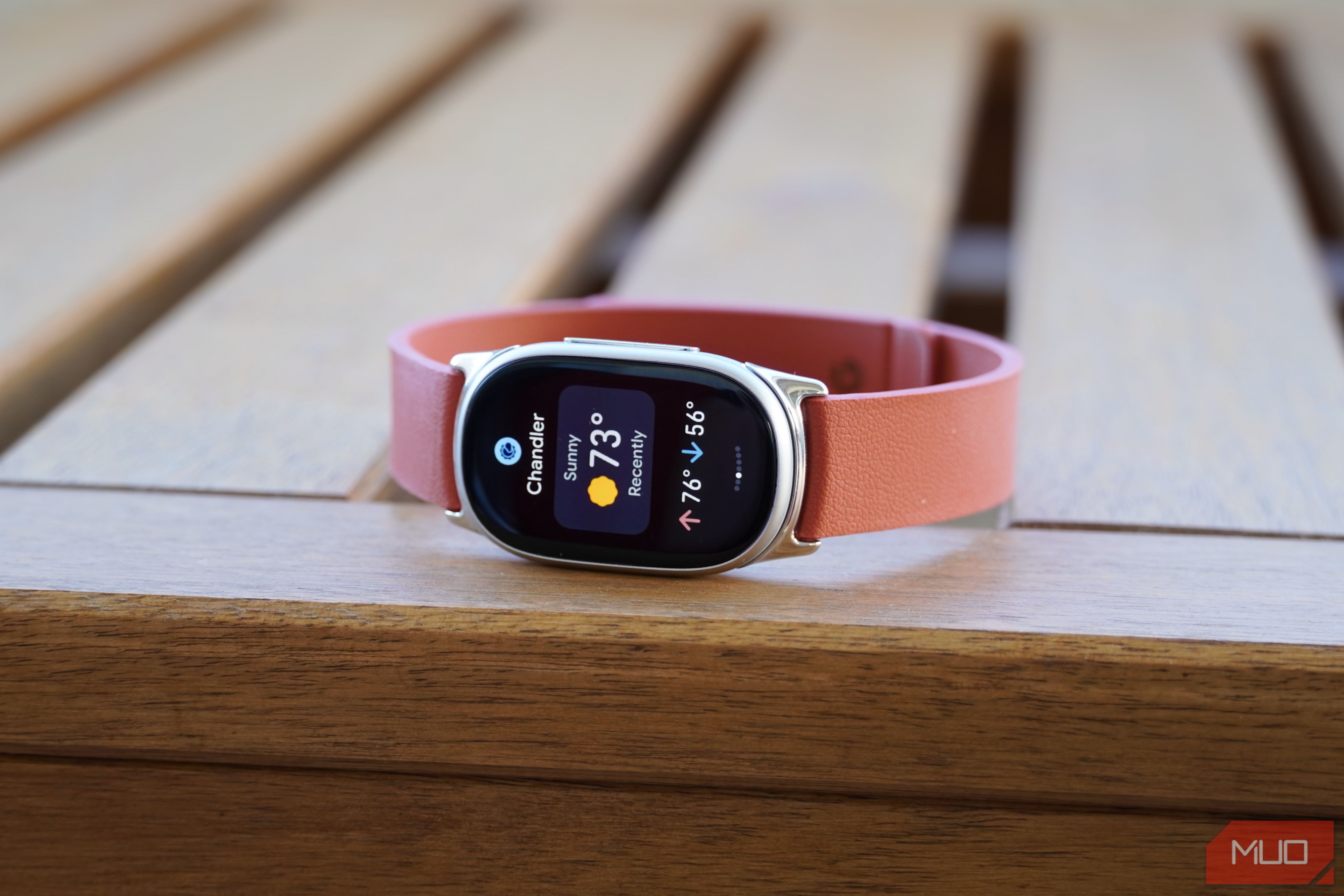
Are you tired of smartwatches that try to do too much, feeling like a smartphone strapped to your wrist? Do you crave a dedicated fitness tracker that prioritizes your health goals without overwhelming you with unnecessary features? If so, the Google Fitbit Edge might just be the "anti-smartwatch" sweet spot you've been searching for. This guide will walk you through everything you need to know about the Fitbit Edge, helping you decide if it's the perfect companion for your fitness journey.
What You'll Accomplish
By the end of this guide, you will:
- Understand the key features and benefits that make the Fitbit Edge a unique offering.
- Grasp its capabilities in fitness tracking, health monitoring, and daily wear.
- Be aware of its limitations, especially compared to full smartwatches.
- Determine if the Fitbit Edge aligns with your personal fitness and technology needs.
Prerequisites and Requirements
Before diving in, consider these points:
- Fitness Focus: You primarily seek a device to track your fitness and health metrics.
- Simplicity Preferred: You value a straightforward experience over a complex smartwatch operating system.
- Google Health App Use: You are comfortable using the Google Health app on a connected smartphone for data analysis and deeper customization.
- No Smartwatch Necessities: Features like mobile payments (NFC), making calls, or sending custom text replies directly from your wrist are not essential for you.
Discovering the Google Fitbit Edge: The Perfect Balance
The Fitbit Edge emerges as an ideal solution for those who found screenless bands like the Fitbit Air too minimal but aren't ready for the full functionality (and cost) of a device like the Pixel Watch 5. It incorporates crucial upgrades such as onboard GPS, a responsive touchscreen, and an expanded suite of sensors, all while maintaining a user-friendly design and an accessible price point. This tracker truly hits a sweet spot, providing powerful fitness capabilities without the distractions of a full-blown smartwatch.
Sleek Design and All-Day Comfort
The Fitbit Edge represents a significant upgrade from its predecessor, the Fitbit Charge 6, featuring an enhanced design and improved functionality. Its sleek, pill-shaped aesthetic looks sophisticated on the wrist, making it suitable for both your workouts and daily wear as a stylish accessory. The device boasts a vibrant 1.3-inch AMOLED touchscreen, offering clear visibility for your stats and notifications.
Weighing in at just 17.7 grams without its band, the Fitbit Edge is remarkably lightweight, contributing to its comfort during extended wear, including sleep. While its tracking puck is smaller than the Fitbit Air's, the overall profile on your wrist feels similar once a band is attached, ensuring it doesn't feel bulky. The slightly enlarged sensor area on the underside ensures better contact with your skin, which helps prevent the device from shifting during active use, a common issue with some smaller trackers. While the included Active Band is functional, you might find other options, like the Magnet Band, more comfortable for daily wear, or the Performance Loop (available soon) ideal for intense workouts.
Advanced Fitness and Health Tracking at Your Fingertips
One of the most compelling reasons to choose the Fitbit Edge is its robust suite of fitness and health tracking capabilities. It's designed to keep pace with your active lifestyle and provide accurate, detailed insights into your well-being.
Onboard GPS for Phone-Free Workouts
Say goodbye to carrying your phone on runs or hikes! The Fitbit Edge features built-in GPS, allowing you to accurately track your distance, pace, and route without needing your smartphone nearby. This onboard GPS performs exceptionally well, matching the precision of higher-priced devices like the Pixel Watch 5. In testing, it recorded only a minor discrepancy of 0.05 miles compared to an Apple Watch Ultra 4 on a four-mile run, demonstrating impressive accuracy for its price point.
Comprehensive Health Sensors
The Fitbit Edge comes loaded with advanced health sensors, typically found in more premium wearables. These include:
- Optical PPG Heart Rate Sensor: For continuous heart rate monitoring, essential for workout intensity and overall cardiovascular health. During rigorous activities, its heart rate tracking proved consistent with the Apple Watch Ultra 4.
- Electrical Sensors: Enabling features like ECG (electrocardiogram) for assessing heart rhythm.
- Temperature Sensors: For insights into body temperature variations.
- Red and Infrared Sensors: Used for blood-oxygen (SpO2) monitoring.
- Altimeter, Accelerometer, and Gyroscope: For tracking elevation changes, movement, and orientation, contributing to precise activity recognition and step counting.
Intuitive On-Screen Data
The 1.3-inch AMOLED touchscreen, though compact, is highly functional during workouts. You can swipe through various metrics, such as pace, distance, and heart rate, to view the data most relevant to you at any given moment. A convenient feature is its ability to remember the last screen you viewed, ensuring your preferred stats are always just a glance away. For optimal visibility during intense exercise, activating the always-on display (AOD) is highly recommended.
Exceptional Battery Life
The Fitbit Edge provides impressive battery longevity, lasting up to a full week on a single charge when the always-on display is disabled. This means less time worrying about charging and more time focusing on your activities. A simple routine of charging it during your daily shower is often enough to keep it powered throughout the week.
Understanding the Software Experience
The software interface of the Fitbit Edge is clean and intuitive, echoing the modern design language found in Wear OS and the Pixel Watch 5. Navigation is straightforward: swipe left or right to access different tiles displaying key information, swipe down for quick settings, and swipe up to view notifications. A press of the side button brings up your list of pre-installed apps.
However, the software experience isn't without its caveats. The primary hub for managing your device and viewing in-depth health data is the Google Health app. While the app has undergone redesigns and integrates features like the AI-focused Google Health Coach, its crowded interface may not appeal to everyone. Crucially, while basic features don't require a Google Health Premium subscription, the app might feel less comprehensive without it. Many customization options, such as changing watch faces, are only accessible through the Google Health app on your phone, making direct device management somewhat limited. A dedicated app for Fitbit devices, similar to the Pixel Watch app, would enhance usability by streamlining these settings.
Pricing and Availability
The Google Fitbit Edge is set to launch on October 27, 2026, with a retail price of $179.99. Each purchase includes a three-month trial of Google Health Premium, allowing you to explore advanced features. For those seeking a unique look, a Stephen Curry Special Edition is available for $219.99, featuring an exclusive Rye-colored strap (the Performance Loop). Standard editions come with a basic Active Band, but additional bands—Active Sport ($39.99), Performance Loop ($49.99, coming soon), Magnet ($59.99), and Metal Links ($149.99)—can be purchased separately. The Fitbit Edge positions itself competitively within Google's wearable ecosystem, priced between the $100 Fitbit Air and the $400 Pixel Watch 5, succeeding the $160 Fitbit Charge 6.
Is the Google Fitbit Edge Right for You?
The Fitbit Edge stands out as a compelling choice for a specific type of user. It’s an excellent fitness band that excels in its core purpose without trying to be a smartphone on your wrist.
You SHOULD consider buying the Google Fitbit Edge if:
- You desire a fitness band equipped with a comprehensive set of health sensors (GPS, ECG, blood-oxygen, heart rate).
- You appreciate essential phone integrations (like notifications) but do not require advanced smartwatch functionalities.
- You prioritize a comfortable, slim, and lightweight wearable for all-day and all-night wear.
- You want accurate workout tracking without needing your phone.
You should NOT buy the Google Fitbit Edge if:
- You already use a smartwatch and are looking for a completely passive, screenless fitness tracker to wear simultaneously.
- You require a device with NFC for mobile payments, or features like a speaker and microphone for calls and custom replies.
- You find the Google Health app's interface or its subscription model unappealing.
While the Fitbit Edge offers a display, making it less ideal to wear alongside another smartwatch, it shines as a standalone fitness solution. It’s perfect for those who prefer to keep their wrist free of a smartwatch but still want powerful health tracking. It can also be an excellent complement to an analog watch, offering the best of both worlds. For users considering a more comprehensive ecosystem, the Edge can even be paired with a Fitbit Air (totaling $280) to leverage the Air's superior sleep tracking and minimal profile alongside the Edge's active tracking capabilities.
Ultimately, the Fitbit Edge is a focused wearable that delivers exceptional fitness tracking in a sleek, comfortable package. It’s not meant to replace a smartwatch, but rather to serve as a superior fitness band for those who want simplicity and precision without compromise.
Troubleshooting Tips
- Workout Display: If you struggle to see stats during intense workouts, enable the always-on display (AOD) in settings for quick glances.
- Battery Management: To consistently maintain the 7-day battery life (with AOD off), consider a routine of charging your Edge for a short period daily, such as while you shower.
- Customization Access: Remember that most customization features, like changing watch faces, are managed through the Google Health app on your paired phone, not directly on the device.
FAQ
Q: Is a subscription required to use the Google Fitbit Edge's features?
A: No, a Google Health Premium subscription is not required for the basic functionalities of the Fitbit Edge. However, you will receive a three-month trial, and certain advanced insights and features within the Google Health app might feel more complete with a subscription.
Q: Can I use the Fitbit Edge to make mobile payments?
A: No, the Fitbit Edge does not include NFC (Near Field Communication) capabilities, meaning it cannot be used for mobile payments like Google Wallet.
Q: How accurate is the Fitbit Edge's GPS for outdoor activities?
A: The Fitbit Edge's onboard GPS is highly accurate. In comparative testing, it performed very closely to premium smartwatches such as the Pixel Watch 5 and Apple Watch Ultra 4, making it a reliable choice for tracking runs, hikes, and other outdoor workouts without needing your phone.
Next Steps and Related Topics
- Explore Google Health Premium: Take advantage of your complimentary three-month trial to discover advanced health insights and guided programs.
- Consider a Dual Setup: If sleep tracking is a top priority, explore pairing the Fitbit Edge with a Fitbit Air for a comprehensive health monitoring system.
- Compare Wearables: If smartwatch features like calls and payments are critical, research the Google Pixel Watch 5 or other full smartwatches to find a device that better suits those needs.
Related articles
howto: 4 Photoshop plugins so essential they should be built-in
Discover four essential Photoshop plugins that streamline your workflow, save time, and unlock new creative possibilities, making you wonder why they aren't built-in features.

Xreal Unveils Aura Wired Smart Glasses Running Android XR
At the Android Dev Summit on Wednesday, Xreal, Google's smart glasses collaborator, officially introduced its new Xreal Aura wired smart glasses. The device, which had been teased earlier in the year at Google's I/O

Nothing CMF Clip Pro Review: Open-Ear Awareness at a Steal
The Nothing CMF Clip Pro offers a unique open-ear listening experience, designed for situational awareness and comfort. Now $30 off at $69, it's an appealing option for those seeking spacious sound without sealing off the world.
Solve Annoying PDF Problems Locally in Your Browser with BentoPDF
Dealing with PDFs can often feel like a never-ending series of small, annoying tasks. You might need to combine several documents, reduce the size of a bulky file, or even make an image-only scan searchable. Typically,

Your Guide to LG's 115-inch QNED evo TV: Features, Gaming & Price
Welcome to an exciting exploration of LG's latest innovation in home entertainment: the colossal 115-inch QNED evo AI Mini LED TV. This guide is designed to walk you through everything you need to know about this

The Super Mouse puts a touchscreen macro pad under your hand: Tech
Arctic Fox Technologies has launched the Super Mouse, an innovative peripheral featuring a 3.1-inch touchscreen for dynamic app controls, macros, and enhanced productivity. Available on Kickstarter for $199, this wired mouse aims to consolidate multiple desktop devices into one intuitive command center. Its contextual display and advanced features redefine user interaction.