
Discover KolibriOS: The 12MB OS That Boots Faster Than Windows
Welcome to a guide on KolibriOS, an incredibly small yet powerful operating system that challenges the notion of modern software bloat. In an era where operating systems demand gigabytes of storage and memory, KolibriOS
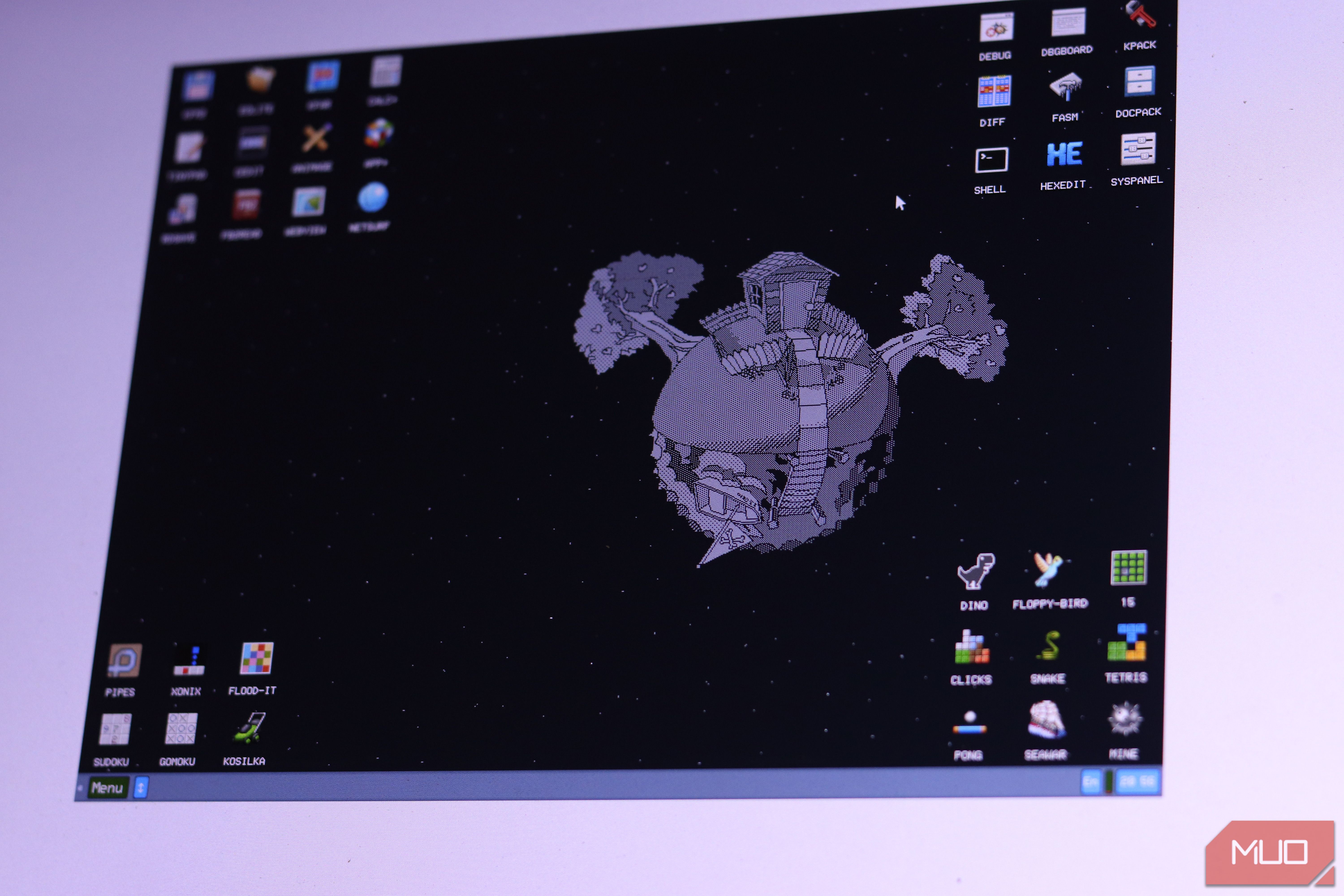
Welcome to a guide on KolibriOS, an incredibly small yet powerful operating system that challenges the notion of modern software bloat. In an era where operating systems demand gigabytes of storage and memory, KolibriOS stands out, fitting into a mere 12 MB and booting faster than Windows. This guide will walk you through what makes KolibriOS unique, its impressive features, and how you can explore its capabilities.
What You'll Learn and Accomplish
By the end of this guide, you will:
- Understand the origins and unique development philosophy of KolibriOS.
- Discover its remarkably low hardware requirements and extensive bundled applications.
- Learn about its practical applications, such as revitalizing old hardware or serving as a learning tool for efficient software design.
- Grasp its current limitations and intended scope, helping you decide if it's right for your experimentation.
Prerequisites and Requirements
KolibriOS is designed for efficiency, so its requirements are minimal. You'll need:
- A computer with an i586-compatible CPU (or newer): This means virtually any x86 PC from the late 90s onwards will work.
- Minimum 8 MB of RAM: Yes, megabytes, not gigabytes! The full ISO image benefits from a bit more, but 8 MB is the baseline.
- Disk Space: A few megabytes for the core OS. The ISO image requires more for its bundled applications.
- An x86 system: KolibriOS is primarily a 32-bit x86 system; it does not support ARM architectures, and there is no actively developed 64-bit version.
To try KolibriOS, you can download an ISO image from its official website. This image can be booted from a CD/DVD, a USB drive (with appropriate tools), or most conveniently, within a virtual machine like VirtualBox or VMWare, which is an excellent way to safely experiment without affecting your main system.
The Genesis of KolibriOS: A Fork from MenuetOS
KolibriOS's journey began as a fork of MenuetOS, an operating system project initiated by Finnish developer Ville Turjanmaa in May 2000. MenuetOS was groundbreaking, a 32-bit OS written entirely in assembly language, capable of fitting on a 1.44 MB floppy disk while offering a GUI, sound, and networking.
In 2005, MenuetOS transitioned to a closed-source 64-bit codebase, leaving its 32-bit contributors without a path forward. This led developer Marat Zakiyanov to start what would become KolibriOS in 2004. Initially a driver-focused distribution of 32-bit MenuetOS, it quickly evolved into an independent, open-source project with global contributors. Its first official release was in May 2004, and development continues to this day.
Unveiling Its Unprecedented Efficiency: All in Assembly
What truly sets KolibriOS apart is its core architecture: it's written entirely in FASM (Flat Assembler), an x86 assembly language. Unlike high-level languages like C or Python, assembly code communicates directly with the processor, offering unparalleled control and efficiency.
Most modern operating systems avoid assembly due to its complexity, but this choice is central to KolibriOS's astonishing performance and tiny footprint. Its monolithic preemptive kernel is less than 100 kilobytes, loading directly into memory without the overhead of language runtimes or garbage collectors. This direct approach ensures system calls are incredibly fast, and its efficiency extends to every bundled application.
Packed with Power: Features in a Tiny Package
Don't let its size fool you; KolibriOS is surprisingly feature-rich:
The Floppy Disk Image (1.44 MB)
Even the smallest version provides a complete system:
- Graphical User Interface (GUI): A fully functional desktop environment.
- Preemptive Multitasking: Allows multiple programs to run concurrently.
- Filesystem Support: Includes FAT12/16/32, with read-only support for NTFS and read/write for exFAT and ext2/3/4.
- Networking: A built-in TCP/IP stack.
- Development Environment: FASM is bundled, allowing for direct assembly programming.
- Multimedia: AC97 audio support and VESA graphics up to 1280x1024 with 16 million colors.
- USB Support: USB 1.1 and 2.0 via UHCI, OHCI, and EHCI controllers.
The ISO Image (More Features, Still Tiny)
For an even richer experience, the ISO image offers over 200 applications, including:
- Productivity Tools: A word processor, image viewer, and graphical editor.
- Web Browsing: A lightweight browser called NetSurf, and an IRC client for chat.
- Classic Gaming: DOSBox for running old DOS software, and over 50 games, including shareware versions of DOOM, Wolfenstein 3D, and Quake.
KolibriOS's network drivers support common cards like Realtek 8139/8169, Intel Pro/1000, and AMD PCnet, making it likely to work with many older systems.
Understanding the Limitations and Intended Scope
While KolibriOS is a marvel of efficiency, it's essential to understand its specific niche. It is not designed to be a replacement for your everyday operating system.
- Browser Capabilities: The bundled NetSurf browser is quite old and cannot render modern web standards like HTML5. This means most contemporary websites will not display correctly or function at all.
- Hardware Compatibility: While it supports common hardware, compatibility for specific network or audio cards can be hit-or-miss. If your hardware isn't on the supported list, you might need to develop your own driver, a task usually reserved for experienced programmers.
- 32-bit x86 Only: It strictly adheres to the 32-bit x86 architecture. This means no support for modern 64-bit applications or different processor architectures like ARM, limiting its use with newer devices.
KolibriOS shines as a demonstration of software craftsmanship and efficiency. It's a testament to what can be achieved with disciplined, low-level programming rather than attempting to be a universal modern OS.
Practical Applications of KolibriOS
Despite its limitations, KolibriOS offers compelling use cases:
- Hardware Resurrection: It's an ideal choice for breathing new life into old x86 machines that are functionally sound but have been abandoned by modern software. It provides a real, usable environment for these vintage computers.
- Learning Tool: For anyone interested in how operating systems work at a fundamental level, KolibriOS is an extraordinary learning resource. Exploring its assembly codebase can teach valuable lessons about computer architecture and efficient programming.
- Proof of Concept: KolibriOS is a powerful argument that software bloat is often a choice, not a necessity. Its existence demonstrates that a fully functional, GUI-based OS can be incredibly compact and fast, inspiring developers to consider efficiency in their own projects.
Its name, Kolibri, comes from the Slavic word for hummingbird—a creature known for speed, efficiency, and resourcefulness. This philosophy is deeply embedded in every aspect of the project.
Next Steps for Exploration
Ready to delve deeper into KolibriOS?
- Visit the Official Website: Head to kolibrios.org to download the latest ISO image and explore its documentation.
- Set Up a Virtual Machine: For the easiest and safest experience, install KolibriOS in a virtual machine environment. This allows you to experiment without altering your main system.
- Explore its Codebase: If you have an interest in low-level programming, delve into its assembly source code to understand its inner workings.
FAQ
Q: Can KolibriOS replace my Windows or Linux daily driver?
A: No, KolibriOS is not designed to be a daily driver OS for modern use. Its primary browser cannot handle HTML5, and hardware compatibility for modern peripherals can be limited. It's best suited for specific tasks like revitalizing old hardware, learning, or as a demonstration of efficiency.
Q: What kind of applications can I run on KolibriOS?
A: KolibriOS comes with its own suite of lightweight applications, including a word processor, image viewer, simple browser, and many games. You can also run classic DOS software via DOSBox. However, you cannot run applications designed for Windows, modern Linux distributions, or macOS.
Q: Is KolibriOS still actively developed?
A: Yes, KolibriOS has been in active development since its first official release in May 2004, with contributions from developers worldwide. While it's a niche project, it continues to evolve and maintain its core philosophy of efficiency.
Related articles

Ditch Merge & Center: The Better Way to Align Text in Excel
Learn to use Excel's "Center Across Selection" to align text across cells without merging, avoiding common data manipulation issues. This guide provides steps to utilize this newly accessible feature and add it to your Quick Access Toolbar.

Stop Android Auto Battery Drain: Essential Features to Disable and
Android Auto offers unparalleled convenience, bringing your phone's most useful features directly to your car's display. From navigation and calls to messages and music, it keeps you connected without distracting you

Turn Your Android Phone into a Powerful Desktop Replacement
Learn how to transform your Android phone into a full-fledged desktop computer using external displays and accessories, providing a cost-effective and integrated alternative to new Googlebooks.

howto: Four Ways the Fitbit Edge Is Better Than the Charge 6, and Two
Learn the key differences between the Fitbit Edge and Charge 6, including four advantages of the Edge and two areas where it falls short, to help you choose the best fitness tracker for your needs.
How to Connect Your Googlebook to a Printer - Print Documents with
Learn to quickly connect your Googlebook to a printer via Wi-Fi, USB, or Bluetooth and print documents in minutes. This guide covers direct printing, app-specific connections, troubleshooting, and even printing screenshots as a workaround.
How to Debloat Windows 11 for a Faster, Cleaner PC
Learn to reclaim your Windows 11 PC's performance by removing bloatware, disabling ads, and optimizing startup processes in five easy steps.