
Chuwi Unibook Review: A Quirky Budget MacBook Neo Alternative
The Chuwi Unibook offers a compelling $449 price point with decent core specs, but its charm is overshadowed by significant compromises in screen quality, trackpad usability, and a peculiar software experience.
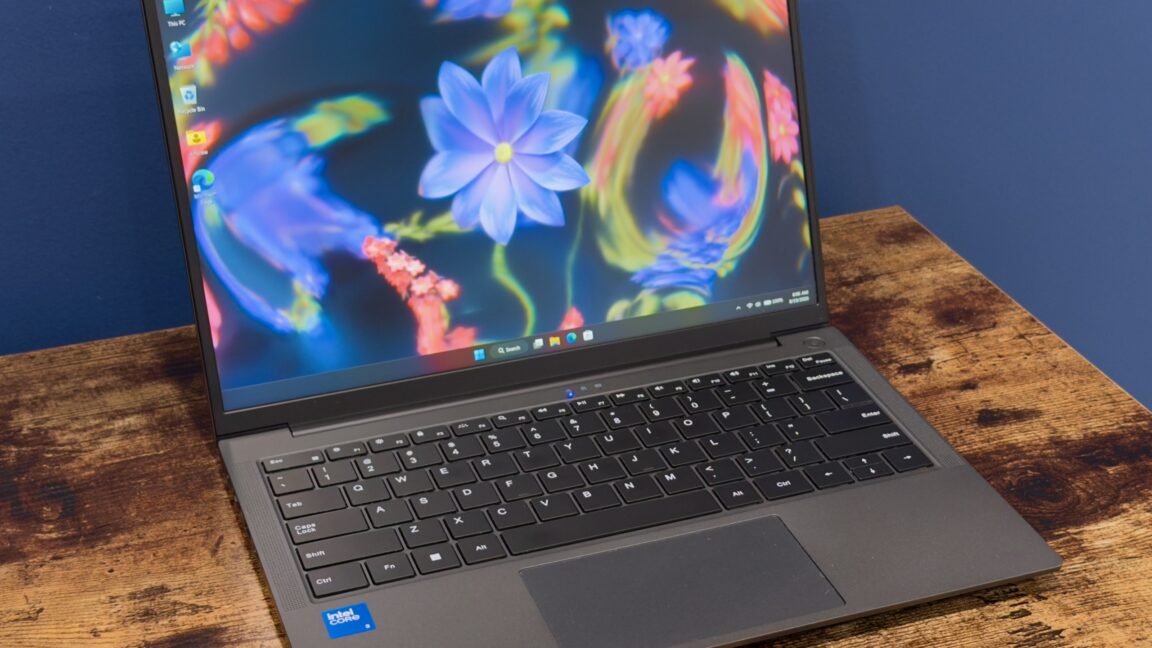
The Chuwi Unibook attempts to carve out a niche in the budget laptop market, offering an introductory price of $449 with Intel's new Core Series 3 (Wildcat Lake) processor, 8GB of RAM, and 256GB of storage. On paper, it seems like a compelling alternative to more expensive options like the MacBook Neo, which saw a price hike to $699. However, the Unibook is a classic case of “you get what you pay for,” delivering a deeply idiosyncratic experience best suited for tech enthusiasts willing to troubleshoot rather than the average consumer.
Quick Verdict
The Chuwi Unibook is a laptop of stark contrasts. It boasts an impressive array of ports and an accessible design for upgrades, coupled with a surprisingly decent keyboard for its price point. Yet, these positives are heavily undermined by a poor screen, an atrocious trackpad, and a baffling, often broken, software and driver support experience. It's a curious machine for hobbyists looking for a project PC, but unequivocally difficult to recommend for anyone else.
Design and Build Quality
At first glance, the Unibook presents itself with a nondescript, functional clamshell design reminiscent of an Asus Zenbook. Its chassis is largely constructed from thin aluminum, which, while not premium, doesn't feel substantially flimsier than many other budget laptops.
Where the Unibook shines in its physical design is its connectivity. It remarkably outstrips the port offerings of many pricier competitors, including the MacBook Neo and the new Dell XPS 13. Users will find two USB-C ports, a full-size HDMI port, two 5Gbps USB 3 ports, one USB 2.0 port, a micro-SD card slot, a headphone jack, and even a gigabit Ethernet port. While the folding Ethernet port design can be a point of concern for long-term durability, the sheer number of options is a welcome relief in an era of minimal connectivity.
Maintenance and upgrades are also surprisingly user-friendly. Eleven Philips-head screws on the bottom panel allow for easy access to the M.2 2280 drive, Wi-Fi module, and battery. This makes replacing the generic “HOGE” branded SSD with a larger or more reputable drive a straightforward process.
The keyboard, too, punches above its weight. While not matching the firm, satisfying feel of a MacBook or Framework laptop, its typing experience is decent, complemented by a nice, even backlight. However, the absence of a fingerprint reader or face-scanning camera means no biometric login options, a feature also missing from the base MacBook Neo.
Display and User Experience Hiccups
The Unibook features a 13-inch IPS display panel with a 1920 x 1200 resolution and a 16:10 aspect ratio, a respectable step up from older 16:9 1080p panels. This is where the positives end for the screen, unfortunately. It manages only about 300 nits of maximum brightness, and the review unit exhibited noticeable backlight bleeding around the edges. More critically, its color accuracy is dismal, covering only approximately 59 percent of the sRGB color gamut. Colors appear visibly faded, particularly reds and purples, a significant disappointment given that Chuwi initially advertised 100 percent sRGB coverage for this model. The company later clarified that only a higher-specced Unibook 315 (which may or may not arrive at $599) would offer better color accuracy, along with an extra CPU P-core, 12GB RAM, and a 512GB SSD.
The woes continue with the Unibook's other core user experience components. The webcam is barely functional, producing fuzzy images with poor white balance. The speakers, while capable of producing sound after some driver troubleshooting, are otherwise unremarkable. The most significant flaw is arguably the trackpad. Despite offering acceptable finger tracking (a common benefit of modern precision trackpads), its physical clicking mechanism is stiff, difficult to actuate, and excruciatingly loud. It's a trackpad so poor it almost single-handedly detracts from the laptop's overall usability, pushing users towards tap-to-click functionality.
Software and Driver Labyrinth
This is where the Chuwi Unibook veers into the truly bizarre and frustrating. Expecting minimal aftermarket software support from lesser-known OEMs is standard, but Chuwi's situation is extreme. Its support website for driver downloads was completely non-functional throughout the review period, displaying an unhelpful “Working Un-normal” message.
The pre-installed Windows 11 image is also highly peculiar. It includes a seemingly activated copy of Microsoft Office 2024, which appears to have been activated via a common script, rather than a legitimate license – a significant red flag for security and legitimacy. Other odd inclusions are a non-functional “mobile plans” app (despite the laptop lacking a modem), the obscure “Microsoft PC Manager” app with its poorly translated interface, and several preinstalled Chinese language packs.
For those accustomed to performing a clean Windows installation, the Unibook presents a formidable challenge. Due to the non-functional support site and Wildcat Lake's relatively new status, Windows Update lacks the necessary drivers. The reviewer’s workaround involved an elaborate process: exporting existing drivers, then patching together generic Intel GPU/NPU drivers, Intel chipset drivers from Dell’s XPS 13 support page (for a similarly specced Wildcat Lake model), a Realtek Wi-Fi driver from Windows Update, and finally, manually installing a specific Bluetooth driver and troubleshooting the audio stack to get sound working via a generic audio controller driver followed by the Intel Smart Sound Technology Bus device. This level of complexity is completely unacceptable for a mainstream device and effectively locks non-technical users into the questionable pre-installed software.
The Unibook vs. The Competition
The Unibook aims to compete in the budget space, primarily against the baseline MacBook Neo and entry-level offerings from traditional PC makers like Dell and Acer. While it offers a tempting price point and superior port selection, it falters significantly in user experience and software stability compared to its rivals.
- MacBook Neo ($699): While more expensive, the Neo is praised for nailing the basics: good keyboard, screen, and build quality. It may have fewer ports and similar base RAM/storage, but offers a polished, integrated experience.
- Dell XPS 13 ($699 non-student): Also based on Wildcat Lake, the XPS 13 promises a more refined experience and comes with proper manufacturer support, albeit at a higher cost and likely with fewer physical ports.
- Acer Swift Air 14 ($699): Another Wildcat Lake contender, expected to offer a more conventional and reliable experience for the price.
The Unibook's main advantage is its introductory $449 price and its robust port selection. However, the compromises in display quality, trackpad usability, and particularly the arduous software/driver situation make it a far less polished and reliable machine than any of its $699 counterparts.
Buying Recommendation
The Chuwi Unibook is a hard sell for the vast majority of laptop buyers. Its attractive introductory price and excellent port selection are overshadowed by significant drawbacks in screen quality, an almost unusable trackpad, and a deeply problematic software and driver support ecosystem.
Do not buy this laptop if you:
- Are an average user expecting a polished, trouble-free experience.
- Need accurate colors for creative work.
- Cannot tolerate a terrible trackpad.
- Are unwilling or unable to perform complex driver troubleshooting and potential clean Windows installations.
Consider this laptop if you:
- Are a tech enthusiast or hobbyist looking for a cheap platform to tinker with (e.g., install Linux).
- Are on an extremely tight budget and prioritize ports over user experience polish.
- Have the patience and technical know-how to navigate severe software and driver issues.
For everyone else, spending the extra $150-$250 on a MacBook Neo or an entry-level Dell or Acer Wildcat Lake laptop will provide a far more satisfying and reliable computing experience.
FAQ
Q: Is the Chuwi Unibook suitable for everyday use like web browsing and office tasks? A: While the Unibook's Core Series 3 processor, 8GB RAM, and 256GB SSD are technically sufficient for basic tasks, the poor trackpad, mediocre screen, and significant software/driver issues severely hamper the overall user experience, making it a frustrating choice for everyday use unless you are highly tolerant of quirks and troubleshooting.
Q: Can I easily upgrade the Unibook's storage or RAM? A: You can easily upgrade the M.2 SSD by removing 11 Philips-head screws. The Wi-Fi card is also accessible. However, the RAM is soldered and cannot be upgraded. Finding a replacement battery may also be difficult.
Q: What are the main advantages of the Chuwi Unibook over more expensive laptops? A: The primary advantages are its lower introductory price of $449 and its extensive port selection, including multiple USB-C, USB-A, HDMI, and even Ethernet. It also has a surprisingly decent keyboard for its price point.
Related articles
Android 17 QPR2 Beta 7.1: The Performance Relief You've Been Waiting
Android 17 QPR2 Beta 7.1: Finally Fixing the QPR1 Performance Woes Verdict: Android 17 QPR2 Beta 7.1 is a crucial and highly anticipated software update for Google Pixel users, specifically targeting and resolving the

DJI Solo Video Setups: Smart Choices for Lone Creators
This review delves into DJI's recommended solo video setups, highlighting the Osmo Pocket 3 Creator Combo as a top pick for its integrated camera, gimbal, and mic. It also covers stabilizers like the Osmo Mobile 8 and RS 4, and the DJI Mic Mini series for enhanced audio, providing honest pros, cons, and clear buying advice.

Ars Technica's Rocket Report: Your Essential Space Industry Briefing
Quick Verdict Ars Technica's Rocket Report, presented by veteran space reporter Stephen Clark, offers an invaluable and meticulously organized weekly (or similar frequency, implied by "Edition 9.15") digest of the most

Apple iPhone Duo: A Daring Debut with Notable Compromises
Apple's highly anticipated iPhone Duo, priced at $2,000, has gone on pre-order. While hailed as "Apple's most exciting device in a decade" for its innovative foldable design and immersive display, it comes with significant drawbacks like the absence of FaceID and a premium camera.

KDE Plasma 6.8: A Future-Focused 30th Anniversary Update
Quick Verdict KDE Plasma 6.8, arriving as the "30th Anniversary Edition," is a pivotal release that decisively pushes the desktop environment into the future. With a definitive farewell to native X11 sessions and a

Ephemeral PR Preview Environments on GKE: A Deep Dive
Every development team eventually grapples with the limitations of shared staging environments. The familiar scenario: multiple features deployed simultaneously, database migrations clashing, and the phrase "it works on