
3 Clever Ways ESP32 Revitalizes Retro Computers
Discover three clever ways the versatile ESP32 microcontroller is revitalizing retro computers, from adding Wi-Fi and emulating disk drives to running full system emulators. Learn how this affordable board breathes new life into vintage tech.
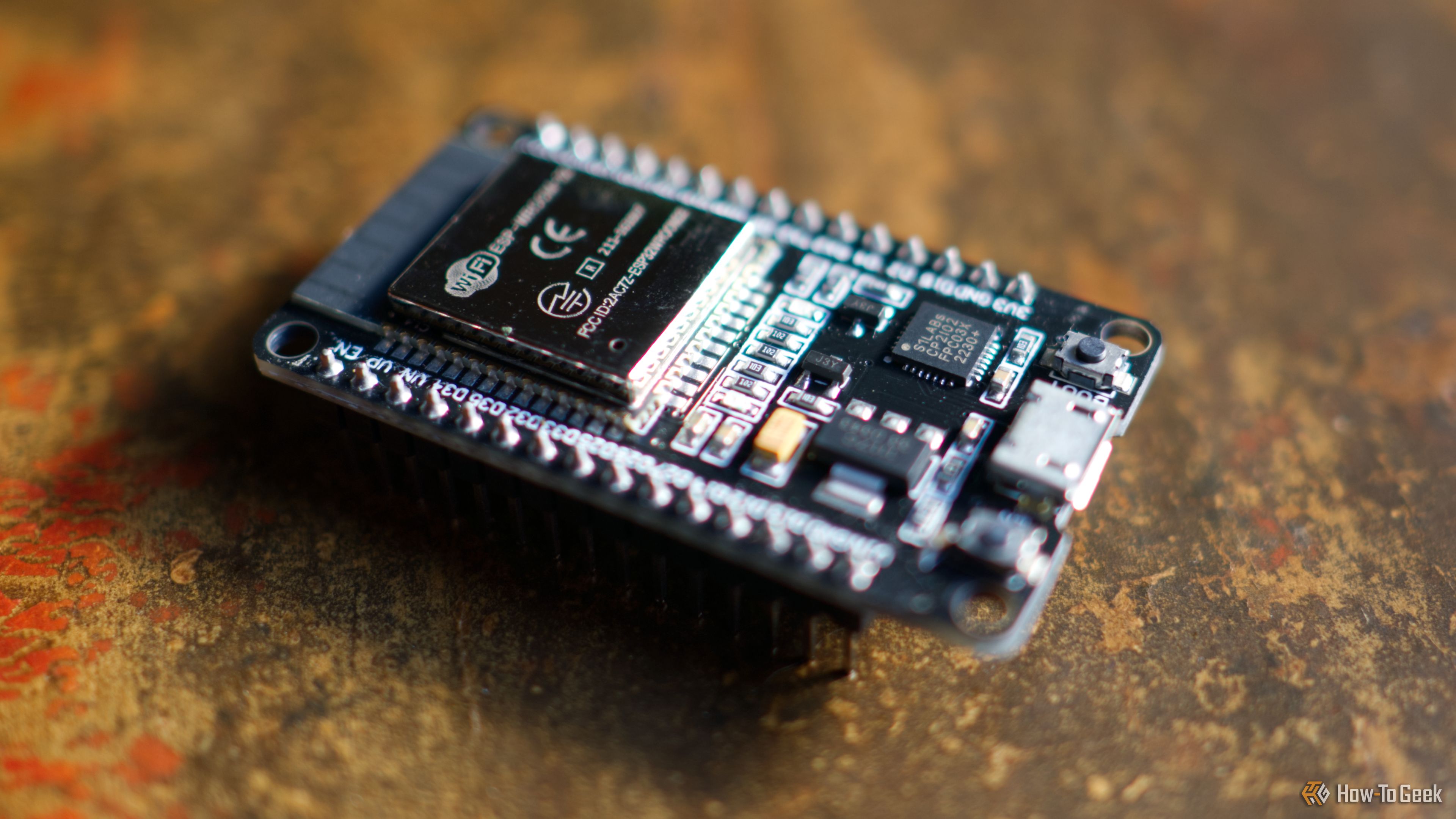
Time is often the biggest adversary for cherished old technology. As components fail and modern connectivity becomes a standard, retro computers can feel increasingly isolated and difficult to maintain. Fortunately, affordable and versatile modern tools like the ESP32 microcontroller are stepping in, offering ingenious ways to breathe new life into these classic machines. This guide will walk you through three clever methods the ESP32 employs to save retro computers from the brink of extinction, allowing enthusiasts to enjoy their vintage hardware with enhanced functionality.
What You'll Accomplish
By the end of this guide, you'll understand how the ESP32 can:
- Grant Wi-Fi Connectivity: Add modern wireless networking capabilities to ancient machines that were never designed for the internet.
- Emulate Disk Drives: Replace failing or limited original storage with practically infinite modern storage, preserving original media.
- Emulate Entire Systems: Recreate the experience of old PCs and game consoles on new, compact hardware.
Prerequisites and General Requirements
While specific components will vary based on the project, here are some general requirements you'll likely need to get started:
- An ESP32 Development Board: The core component for all these projects.
- Basic Soldering Skills (Optional but Recommended): Many projects involve some level of assembly, though pre-made solutions exist.
- Understanding of Your Retro Computer's Ports: Knowing your machine's serial, peripheral, or drive connectors is crucial.
- Access to Project Firmware/Software: You'll need to flash specific software to the ESP32.
- SD Cards or USB Drives: For disk emulation projects.
1. Adding Wi-Fi to Ancient Machines
Retro computers were built long before Wi-Fi became ubiquitous. Connecting them to the modern internet, or even simple local networks, was an unheard-of concept. However, a cheap ESP32 can act as a bridge, allowing these vintage systems to access networked files, old bulletin board (BBS) communities, and even Gopher sites, which are still maintained by dedicated enthusiasts. Some advanced setups can even enable data streaming or downloading with custom software.
How It Works:
The method for adding Wi-Fi depends heavily on the retro computer's original architecture. Here are common approaches:
- Serial Port Emulation: Many projects use the ESP32 to emulate an old-fashioned dial-up modem connected via a serial port. This allows the retro computer to "dial" into a Wi-Fi network provided by the ESP32.
- Proprietary Expansion Cards/Peripheral Ports: Some solutions leverage existing expansion slots or peripheral ports, acting as a custom network interface card.
Getting Started:
- Explore DIY Projects: Projects like
apple2idiot(for Apple II) rely on proprietary expansion cards. You can also build aWiFiModem32usingZimodem firmwarefor dial-up connection emulation in various hardware configurations. - Consider Pre-assembled Adapters: If you're not keen on extensive assembly, many pre-made adapters are available.
FujiNet boards, for instance, plug into the peripheral ports of various systems (like Atari 8-Bit) and provide a suite of networked functionalities, including file streaming.
Tips for Wi-Fi Integration:
- Check Compatibility: Always verify that the chosen ESP32 Wi-Fi solution is compatible with your specific retro computer model.
- Community Resources: Leverage retro computing forums and project GitHub pages for detailed instructions and support. These communities often provide necessary software and configuration files.
2. Emulating Old Disk Drives
Original floppy and hard disk drives in retro computers are prone to failure due to age, mechanical wear, and magnetic media degradation. Replacing them can be difficult, expensive, or even impossible. Moreover, their limited storage capacity can be a major hurdle for enthusiasts who want to enjoy a vast library of software on authentic hardware.
ESP32-based drive emulators provide an elegant solution. They adapt modern, reliable storage media—typically SD cards or USB drives—to interface with the retro computer's legacy drive connectors (like 34-pin floppy connectors or specific bus ports). This effectively gives the retro machine access to virtually unlimited storage.
How It Works:
- Hardware Interface: The ESP32 board is configured with custom firmware and connected to the retro computer's disk drive interface (e.g., a 34-pin connector for floppy drives, or 19-pin/13-pin bus ports).
- File System Emulation: The ESP32 reads disk image files (like
.dskor.adf) from an SD card or USB drive and presents them to the retro computer as if they were physical floppy disks or a hard drive.
Getting Started:
- FujiNet as an All-in-One: The
FujiNetproject, mentioned earlier, is highly versatile and can emulate storage media across many retro platforms. - Niche Solutions: For very specific machines, like the Apple Lisa, projects such as
EsProFileoffer dedicated ESP32-based storage emulation.
Tips for Disk Drive Emulation:
- Original Speeds: While you gain immense storage capacity, don't expect modern transfer speeds. The emulator will typically mimic the original, slower transfer rates of the vintage drives for authenticity (far less than a megabyte per second for a 3.5-inch floppy).
- Preservation: This method is excellent for preserving original floppy disks or hard drives, as you no longer need to risk damaging them through repeated use.
- Convenience: Enjoy the convenience of having an entire software library on a single SD card, eliminating the need to constantly swap physical disks.
3. Emulating Entire Desktops
Sometimes, the original hardware is simply beyond repair, too rare, or too cumbersome to maintain. In such cases, the ESP32 can serve as a powerful emulator for entire retro PCs and game consoles, offering a mostly faithful software experience without the physical constraints of vintage systems. While this doesn't directly save original hardware, it keeps the spirit and functionality of retro computing alive and accessible.
How It Works:
- System-on-Chip Emulation: The ESP32 runs specialized firmware that emulates the CPU, memory, and peripherals of an older system. This allows it to boot and run vintage operating systems, applications, and games, like Mac OS 8.1.
- Modern Form Factors: These emulators can be built into various modern form factors, from small handheld devices with touchscreens and wireless controller support to unique e-ink screen implementations, such as the
Ink-Boy project.
Getting Started:
- Explore Emulator Projects: Projects like
RetroESP32andRetroESP32-P4provide comprehensive platforms for emulating a wide range of retro systems. - Hardware Considerations: Keep in mind that the ESP32 has limited hardware resources. Emulators like
FabGL IBM PC emulatorsometimes need to use older Espressif ESP32 libraries or run "bare-metal" (loading directly into the emulated system without a separate launcher) to optimize performance and resource usage. - Pre-assembled Products: If you prefer a plug-and-play solution, the market is rich with ESP32-powered emulation devices. Websites like AliExpress, eBay, and Etsy, as well as individual passion project sites, often feature pre-built retro emulators.
Tips for System Emulation:
- Compromises: Be aware that some emulators might make slight compromises to fit within the ESP32's memory and processing capabilities. This usually means prioritizing a smooth experience over absolute 100% accuracy in every edge case.
- Customization: The DIY nature of ESP32 allows for incredible customization of your retro computing experience, from integrating modern input methods to creating unique display setups.
Next Steps
The ESP32 is a fantastically versatile board, capable of far more than just rescuing retro computers. Consider exploring other ESP32 projects to bring old gadgets like iPods or game consoles back to life, or even create smart home devices. The possibilities are truly endless, limited only by your imagination and a bit of technical know-how.
FAQ
Q: Does adding an ESP32 Wi-Fi modem to my retro computer make it compatible with modern websites?
A: While an ESP32 can provide network connectivity, retro computers are fundamentally limited by their original operating systems and web browsers. They can interact with simpler networked files, Gopher sites, and BBS communities, but they are not designed to browse the modern, complex web.
Q: Will an ESP32 disk emulator increase the speed at which my retro computer accesses data?
A: No. ESP32 disk emulators are designed to mimic the original drive's behavior, including its transfer speeds, for an authentic experience. The primary benefits are virtually unlimited storage, enhanced reliability, and the convenience of using modern media like SD cards, rather than speed improvements.
Q: Is building an ESP32 project for retro computers always a complex DIY task?
A: Not necessarily. While many projects involve assembly and flashing firmware, there are numerous pre-assembled ESP32 adapters and emulation devices available for purchase. These pre-made solutions can be a great starting point if you're new to electronics or prefer a more plug-and-play experience.
Related articles

Ditch Merge & Center: The Better Way to Align Text in Excel
Learn to use Excel's "Center Across Selection" to align text across cells without merging, avoiding common data manipulation issues. This guide provides steps to utilize this newly accessible feature and add it to your Quick Access Toolbar.

Stop Android Auto Battery Drain: Essential Features to Disable and
Android Auto offers unparalleled convenience, bringing your phone's most useful features directly to your car's display. From navigation and calls to messages and music, it keeps you connected without distracting you

Turn Your Android Phone into a Powerful Desktop Replacement
Learn how to transform your Android phone into a full-fledged desktop computer using external displays and accessories, providing a cost-effective and integrated alternative to new Googlebooks.

howto: Four Ways the Fitbit Edge Is Better Than the Charge 6, and Two
Learn the key differences between the Fitbit Edge and Charge 6, including four advantages of the Edge and two areas where it falls short, to help you choose the best fitness tracker for your needs.
How to Connect Your Googlebook to a Printer - Print Documents with
Learn to quickly connect your Googlebook to a printer via Wi-Fi, USB, or Bluetooth and print documents in minutes. This guide covers direct printing, app-specific connections, troubleshooting, and even printing screenshots as a workaround.
How to Debloat Windows 11 for a Faster, Cleaner PC
Learn to reclaim your Windows 11 PC's performance by removing bloatware, disabling ads, and optimizing startup processes in five easy steps.