
How to Pick the Perfect ESP Board for Your Project - Save Time & Money
Learn to identify the right ESP32 board variant for your specific project needs in a few simple steps, avoiding compatibility issues and wasted purchases.
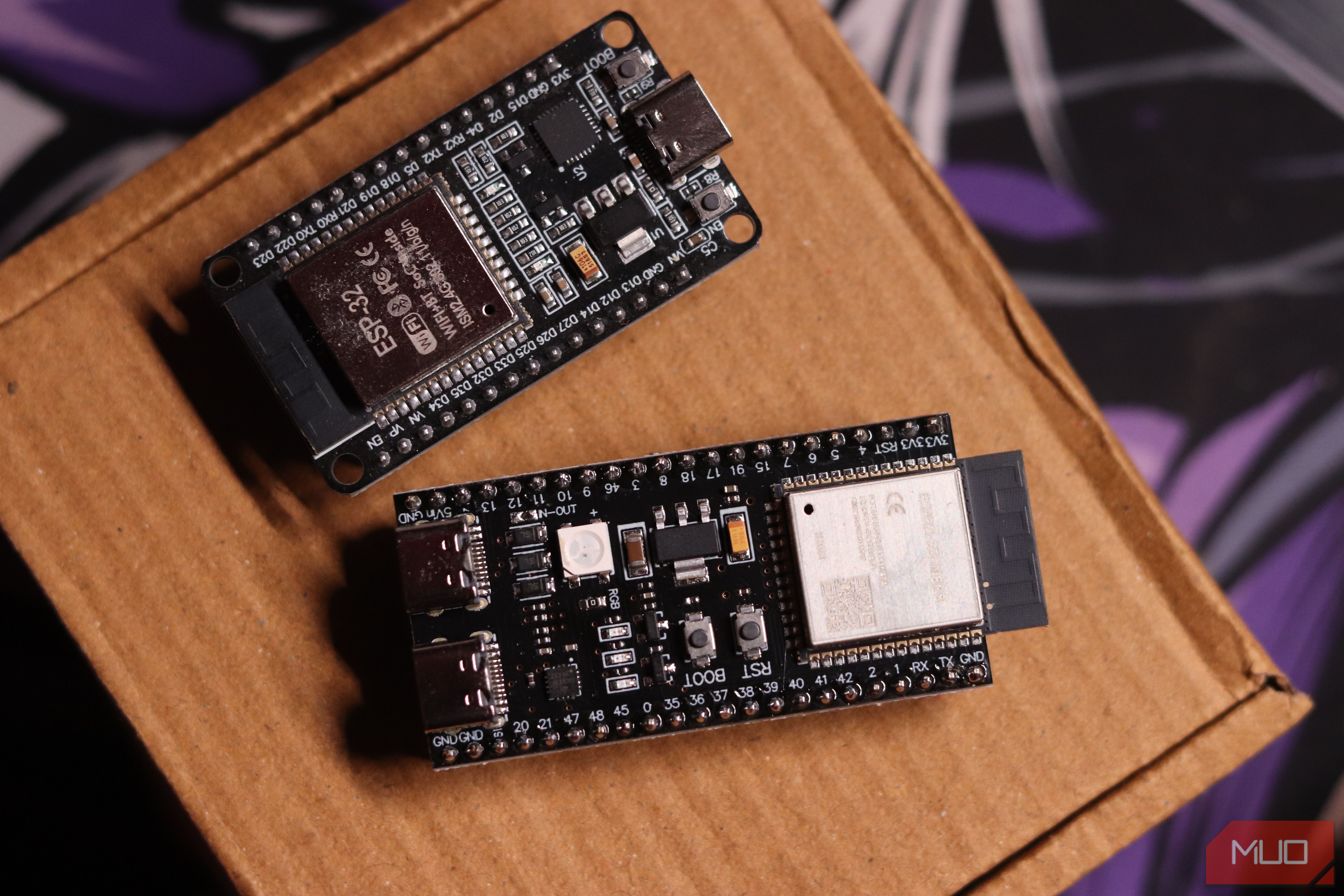
Ever excitedly start a new IoT project, only to hit a wall because your shiny new ESP32 board just won't cooperate? You're not alone. Many makers, including experienced ones, have wasted money and time picking what they thought was the 'right' ESP32, only to discover crucial hardware differences lurking beneath seemingly identical exteriors. This guide will help you navigate the confusing world of ESP32 variants so you can confidently select the perfect board for your next creation, saving you frustration and wasted cash.
What You'll Accomplish
By following this guide, you will learn to:
- Understand the key differences between various ESP32 chip generations (ESP32, ESP32-S2, ESP32-S3, ESP32-C3/C5).
- Identify crucial hardware features like PSRAM and Bluetooth capabilities.
- Confidently decipher product listings and project requirements.
- Make an informed purchase, ensuring your chosen ESP board is perfectly suited for your project, avoiding compatibility issues and wasted resources.
Prerequisites Before You Shop
Before you dive into board selection, you'll need a clear understanding of your project's requirements. Specifically, ask yourself:
- What core functionality does your project absolutely require (e.g., Wi-Fi, Bluetooth)?
- What kind of processing power and memory (RAM) will your application demand?
- Does the project documentation or tutorial specify any particular ESP32 chip or module variant?
Demystifying the ESP32 Family Tree
The confusion often starts with the naming conventions used by Espressif, the company behind the ESP32. What might look like minor revisions, indicated by suffixes like S2, S3, C3, and C5, are actually completely distinct chips with unique capabilities and hardware requirements. Let's break down the main players:
- Original ESP32 (Launched 2016): This is a powerful dual-core chip, running on a Tensilica Xtensa LX6 processor at up to 240 MHz. It comes with 520 KB of SRAM and supports both Wi-Fi and Bluetooth (Classic and BLE). However, not all original ESP32 boards are created equal when it comes to PSRAM.
- ESP32-S2: Built around a single-core LX7 processor, the S2 has 320 KB of SRAM. A critical distinction is its lack of Bluetooth capabilities. It's often well-suited for applications requiring USB On-The-Go (OTG) or power-sensitive projects where Bluetooth isn't a necessity.
- ESP32-S3: This variant boasts a dual-core LX7 processor and adds Bluetooth 5.0 (BLE only). Crucially, the ESP32-S3 often comes equipped with significant amounts of external RAM, or PSRAM, frequently featuring 8 MB or more. This makes it a formidable choice for memory-intensive tasks and large-dataset projects.
- ESP32-C3 / ESP32-C5: These variants are generally designed for simpler, low-power sensor roles and other straightforward applications where advanced features or extensive memory aren't required.
Why PSRAM is a Game-Changer for Your Projects
One of the most overlooked yet critical features is PSRAM (Pseudo-Static RAM). PSRAM acts as external RAM, significantly expanding the chip's usable memory beyond the on-board SRAM. For many projects, especially those that process large amounts of data, PSRAM isn't just a bonus—it's a requirement.
Consider a project like turning your ESP32 into a DNS sinkhole (e.g., ESP32 AdBlocker). The project's documentation might explicitly state that it requires an ESP32-S3 with 8 MB PSRAM to host a full-sized blocklist, or an original ESP32 with 4 MB PSRAM might truncate it. In either case, the project technically only works if the board has PSRAM.
If you purchase a bare-bones ESP32-S2 without PSRAM for such a project, it simply won't run properly. Even if you manage to flash the code, the board lacks the necessary hardware to execute the program correctly. You might not even get clear error messages; instead, the board could get stuck in a boot loop, crashing before it can report anything useful through the Serial Monitor.
Navigating the Confusing World of Online Listings
The problem of selecting the correct board is further complicated by online retailers. They often use inconsistent umbrella terms like "ESP32 Devkit," "ESP32-S Devkit," or "ESP32-S3 Devkit," all of which can appear in the same search results, making precise identification difficult.
Adding to this, even within the same chip generation (e.g., the original ESP32), there are variants that differ in PSRAM inclusion. The ESP32 WROVER module typically includes PSRAM, while the more common (and often cheaper) ESP32 WROOM module does not. This means you could end up with a technically correct "original ESP32" board that is still useless for PSRAM-dependent projects because you unknowingly bought the wrong module variant.
Your Step-by-Step Guide to Choosing the Right ESP Board
Step 1: Start with Your Project's Hardware Requirements
Before you even look at product listings, thoroughly review the project's documentation. Many projects will specify exact chip versions, memory requirements, or specific modules. This is your most reliable source of information. Trust these notes over generic product titles.
Step 2: Assess Bluetooth Requirements
If your project relies on Bluetooth connectivity (either Classic or BLE), immediately rule out the ESP32-S2. This variant entirely lacks Bluetooth capabilities. For BLE-only needs, the ESP32-S3 is a strong candidate, while the original ESP32 offers both Classic and BLE.
Step 3: Determine PSRAM Necessity
For projects that handle large datasets, complex algorithms, or require expanded memory (like a DNS sinkhole or web server), PSRAM is essential. If the project specifies PSRAM:
- For original ESP32: Explicitly look for the "WROVER" module variant in the product description. This typically comes with 4 MB of PSRAM.
- For ESP32-S3: Look for listings that clearly specify "onboard PSRAM" and its capacity (e.g., "8MB PSRAM"). While common on S3, it's not guaranteed.
Step 4: Cross-Reference with Specific Chip Variant Recommendations
If the project's documentation recommends a specific chip generation or variant (e.g., "ESP32-S3 with 8MB PSRAM"), prioritize this. Generic "ESP32 module" labels from retailers are often insufficient to guarantee compatibility.
Step 5: Verify the Module Variant (Especially for Original ESP32)
When purchasing an original ESP32, distinguish between the WROVER and WROOM modules. The WROVER variant includes 4 MB of PSRAM, making it suitable for moderate-complexity projects requiring more memory. The WROOM variant, lacking PSRAM, is more budget-friendly but unsuitable for memory-intensive tasks.
Tips for Success
- Moderate Complexity: An original ESP32 in a WROVER variant (with 4 MB PSRAM) is a versatile choice for many projects.
- High Performance/Large Datasets: For demanding applications like DNS sinkholes or projects with extensive data processing, the ESP32-S3 with 8MB or more PSRAM is often the best fit due to its faster processor and expanded memory.
- USB OTG/Power Sensitivity (No Bluetooth): If your project prioritizes USB On-The-Go functionality or power efficiency and doesn't require Bluetooth, the ESP32-S2 is a good candidate.
- Simple Sensor Roles: For straightforward, low-power sensor applications, the ESP32-C3 or C5 variants are excellent choices.
Troubleshooting: What if Your Project Doesn't Work?
If your ESP32 project fails to boot correctly, gets stuck in a continuous loop, or doesn't report clear error messages in the Serial Monitor, it's a strong indicator that you might have purchased the wrong board. This is especially true if you suspect PSRAM was required and your board lacks it. Double-check your board's actual specifications against the project's memory and feature requirements. Often, the solution is simply getting the correct board with the necessary hardware.
By dedicating a few extra minutes to understanding chip variants, PSRAM, and carefully checking project requirements against product specifications, you'll save yourself significant time, money, and frustration. The ESP32 ecosystem offers incredible possibilities for makers and developers; just make sure you pick the right tool for the job. Happy making!
FAQ
Q: Can I upgrade the RAM on my ESP32 board?
A: No, the internal SRAM and any external PSRAM on ESP32 boards are integrated components of the module and cannot be upgraded or added externally after purchase. You must choose a board that already includes the required memory upfront.
Q: How can I tell if an ESP32 board has PSRAM if it's not clearly stated in the listing?
A: For original ESP32 boards, look for the "WROVER" module designation, as these typically include 4 MB of PSRAM. For ESP32-S3 boards, while PSRAM is common, it's not universal; always check the specific product listing, accompanying images, or the manufacturer's datasheet for explicit mentions of "PSRAM" or "external RAM" and its capacity. If in doubt, contact the seller directly for clarification.
Q: What's the main functional difference between the ESP32-S2 and ESP32-S3?
A: The primary functional differences are in processing power (the S2 is single-core LX7, while the S3 is dual-core LX7), Bluetooth capabilities (the S2 completely lacks Bluetooth, whereas the S3 includes Bluetooth 5.0 BLE), and PSRAM support (the S3 commonly integrates significant PSRAM, making it much better suited for memory-intensive tasks compared to the S2). The S2 is often preferred for power-sensitive applications without Bluetooth, or those needing USB OTG capabilities.
Related articles

DJI Solo Video Setups: Smart Choices for Lone Creators
This review delves into DJI's recommended solo video setups, highlighting the Osmo Pocket 3 Creator Combo as a top pick for its integrated camera, gimbal, and mic. It also covers stabilizers like the Osmo Mobile 8 and RS 4, and the DJI Mic Mini series for enhanced audio, providing honest pros, cons, and clear buying advice.

Ditch Merge & Center: The Better Way to Align Text in Excel
Learn to use Excel's "Center Across Selection" to align text across cells without merging, avoiding common data manipulation issues. This guide provides steps to utilize this newly accessible feature and add it to your Quick Access Toolbar.

Ars Technica's Rocket Report: Your Essential Space Industry Briefing
Quick Verdict Ars Technica's Rocket Report, presented by veteran space reporter Stephen Clark, offers an invaluable and meticulously organized weekly (or similar frequency, implied by "Edition 9.15") digest of the most

Ubisoft Proposes German Studio Workforce Reduction Amidst
Ubisoft is planning a voluntary departure program for about 100 employees across its Düsseldorf, Berlin, and Mainz studios in Germany. This move is part of a larger, ongoing cost-reduction and restructuring effort by the publisher, aiming to better position its studios for future projects.

Stop Android Auto Battery Drain: Essential Features to Disable and
Android Auto offers unparalleled convenience, bringing your phone's most useful features directly to your car's display. From navigation and calls to messages and music, it keeps you connected without distracting you

Turn Your Android Phone into a Powerful Desktop Replacement
Learn how to transform your Android phone into a full-fledged desktop computer using external displays and accessories, providing a cost-effective and integrated alternative to new Googlebooks.