
Google Calendar's New Colors: A Vibrant Upgrade
Google Calendar just received a significant upgrade to its event coloring options, moving from 11 to 24 default hues, with web users gaining access to an RGB color picker for hundreds of choices. This review dives into how this impacts organization and user experience.
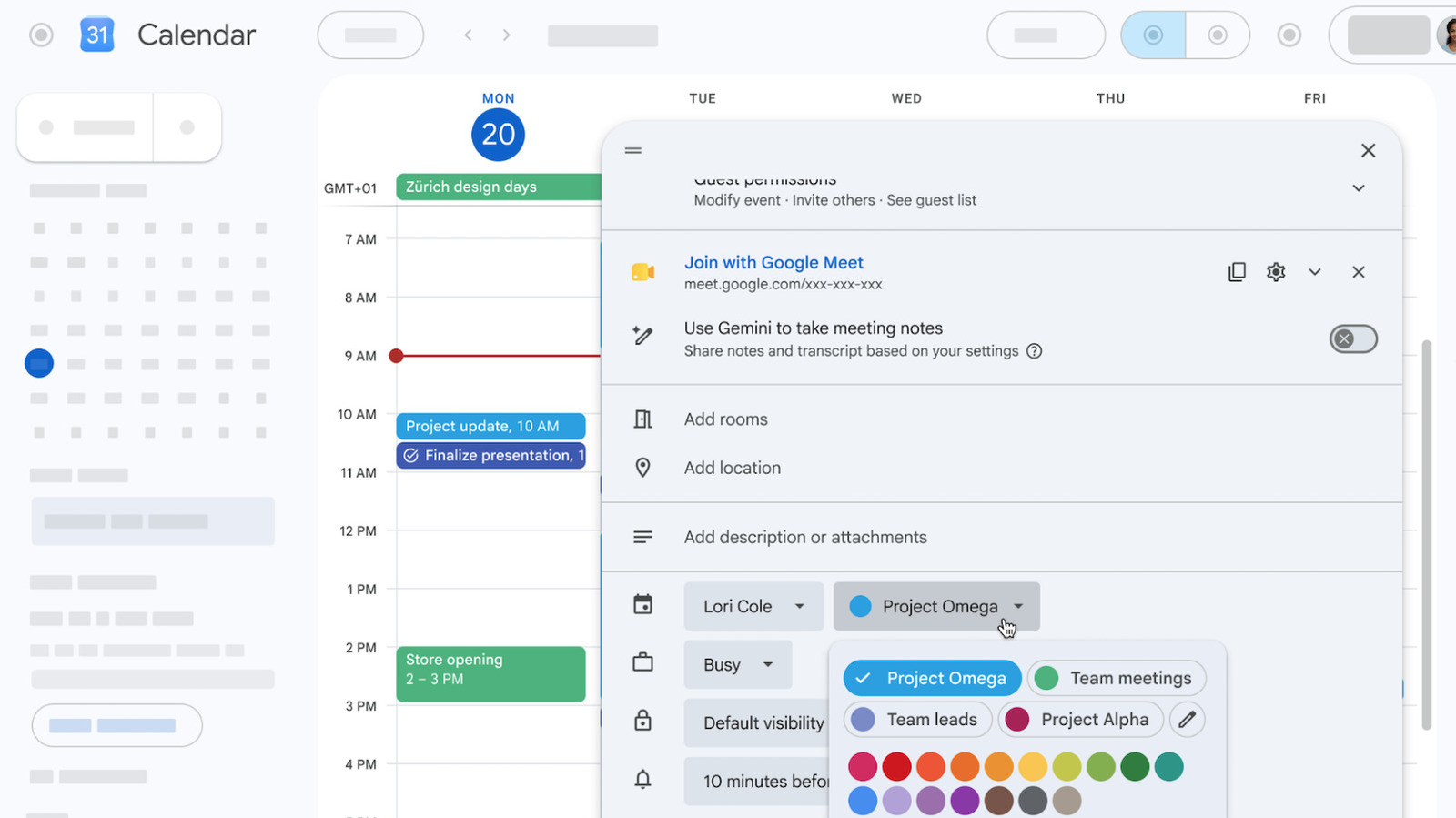
Google Calendar, the ubiquitous digital organizer, has just rolled out a colorful upgrade that’s surprisingly impactful. Moving past its restrictive palette of just 11 predefined event colors, users can now choose from a much broader spectrum. For those who live and breathe by their schedule, this seemingly minor tweak offers a significant boost to visual organization, especially for web users who gain access to a full RGB color picker. While mobile users get an expanded 24-color selection, the full customization remains a desktop privilege. Overall, this is a welcome, albeit slightly uneven, enhancement to an already essential tool.
The Color Revolution: Deeper Dives into Customization
For years, Google Calendar users were confined to a rather limited set of 11 basic colors to categorize their events. While functional, it often meant doubling or even tripling up on colors for different event types, leading to a visual clutter that undermined the very purpose of color-coding. The latest update addresses this directly, transforming the visual landscape of your digital day planner.
Now, users will find a default palette of 24 distinct color options, a substantial improvement right off the bat. But the real game-changer, particularly for those who do their heavy scheduling on a computer, is the introduction of a full RGB color picker for web users. This means you’re no longer limited to Google’s choices; you can select virtually any hue imaginable to perfectly match your personal organizational system, mood, or even corporate branding. This expands the possibilities from a meager 11 to well over 200 unique shades, offering unparalleled personalization.
User Experience: A Brighter Outlook for Organization
The impact of these expanded color options on the user experience is immediate and largely positive. For individuals managing complex schedules – be it project managers, students juggling classes, or busy parents – the ability to assign unique colors to different categories of events (e.g., work meetings, personal appointments, family commitments, specific projects, leisure activities) drastically improves at-a-glance comprehension. A quick glance at your calendar can now tell you exactly what kind of day or week lies ahead, without needing to read every event title.
The distinction between web and mobile capabilities, however, is a notable point. While desktop users can revel in the boundless choices of the RGB picker, mobile app users are restricted to the 24 predefined colors. From a practical standpoint, this isn't a deal-breaker for most, as many users, myself included, tend to handle primary schedule creation and detailed management on a larger screen. The mobile app often serves as a quick reference tool to "keep an eye on things." For this purpose, 24 distinct colors are perfectly adequate for visual differentiation. Nevertheless, it's worth noting that the full expressive freedom isn't consistently available across all platforms.
Implementation and Availability
Google has made this feature a standard part of the Calendar experience; it’s on by default, though users retain the ability to customize its settings. The rollout is currently underway but, as is common with Google updates, it’s a staggered process that could take a few weeks to reach all users globally. This enhancement isn't exclusive to paid subscribers; it’s available to all Google Workspace customers, Workspace Individual subscribers, and even those with a free personal Google account. This widespread availability ensures that the vast majority of Google Calendar's immense user base – recognized as the world’s most popular calendar app – will benefit from this upgrade.
Pros and Cons
Pros:
- Enhanced Visual Organization: The dramatic increase in color options allows for much finer categorization and clearer visual distinctions between different types of events.
- Unparalleled Personalization: Web users gain an RGB color picker, offering virtually limitless customization to match individual preferences or complex organizational schemes.
- Improved At-a-Glance Clarity: Quickly identify event types without needing to read details, streamlining schedule comprehension.
- Widespread Availability: Accessible to all Google Calendar users, including free personal accounts, Workspace customers, and Workspace Individual subscribers.
- Automatic Activation: The feature is on by default, making it easy for users to immediately benefit.
Cons:
- Inconsistent Mobile Experience: Mobile users are limited to 24 colors and lack the RGB color picker available on the web, meaning full customization isn't portable.
- Gradual Rollout: Users may have to wait a few weeks before the feature becomes available on their account.
A Fresh Coat for the World's Most Popular Calendar
While the source content doesn't delve into a direct comparison with competing calendar applications regarding color customization, it's clear that this update significantly elevates Google Calendar's own offering. Previously, its 11-color palette felt dated and restrictive, especially when compared to the visual flexibility some users might seek in dedicated productivity or design tools. With the introduction of 24 default colors and the robust RGB picker for web, Google Calendar not only catches up but potentially surpasses many in terms of pure aesthetic customizability within the calendar space.
It’s also important to remember that this color update is part of a broader ongoing effort by Google to enhance its calendar platform. Recent additions include the ability to schedule personal tasks directly within the calendar and an AI-powered feature designed to suggest optimal meeting times for participants. These combined efforts demonstrate Google’s commitment to refining its flagship scheduling tool, ensuring it remains at the forefront of digital organization.
Recommendation
For anyone who uses Google Calendar, this update is a resounding positive. It’s a free enhancement that makes an already indispensable tool even more powerful and personal. If you're a creature of habit who relies on visual cues to manage your day, the expanded color options, particularly the RGB picker on the web, will be a game-changer for your productivity and mental clarity. Even mobile-only users will appreciate the expanded default palette. There’s no reason not to embrace this upgrade – it only stands to improve your organizational workflow. Consider it an essential, subtle refinement that makes a big difference in daily usability.
FAQ
Q: How many new color options are available in Google Calendar? A: Google Calendar now offers 24 default color options for events. Additionally, web users gain access to a full RGB color picker, allowing for virtually unlimited custom color choices, expanding beyond the initial 11 predefined hues.
Q: Is the full RGB color picker available on mobile devices? A: No, the full RGB color picker is currently exclusive to web users. Mobile app users will have access to the expanded set of 24 default colors but not the granular RGB customization tool.
Q: Do I need a paid Google Workspace account to access these new color features? A: No, this feature is available to all Google Calendar users. This includes those with a free personal Google account, Google Workspace customers, and Workspace Individual subscribers.
Related articles
Android 17 QPR2 Beta 7.1: The Performance Relief You've Been Waiting
Android 17 QPR2 Beta 7.1: Finally Fixing the QPR1 Performance Woes Verdict: Android 17 QPR2 Beta 7.1 is a crucial and highly anticipated software update for Google Pixel users, specifically targeting and resolving the

DJI Solo Video Setups: Smart Choices for Lone Creators
This review delves into DJI's recommended solo video setups, highlighting the Osmo Pocket 3 Creator Combo as a top pick for its integrated camera, gimbal, and mic. It also covers stabilizers like the Osmo Mobile 8 and RS 4, and the DJI Mic Mini series for enhanced audio, providing honest pros, cons, and clear buying advice.

Ars Technica's Rocket Report: Your Essential Space Industry Briefing
Quick Verdict Ars Technica's Rocket Report, presented by veteran space reporter Stephen Clark, offers an invaluable and meticulously organized weekly (or similar frequency, implied by "Edition 9.15") digest of the most

Apple iPhone Duo: A Daring Debut with Notable Compromises
Apple's highly anticipated iPhone Duo, priced at $2,000, has gone on pre-order. While hailed as "Apple's most exciting device in a decade" for its innovative foldable design and immersive display, it comes with significant drawbacks like the absence of FaceID and a premium camera.

KDE Plasma 6.8: A Future-Focused 30th Anniversary Update
Quick Verdict KDE Plasma 6.8, arriving as the "30th Anniversary Edition," is a pivotal release that decisively pushes the desktop environment into the future. With a definitive farewell to native X11 sessions and a
Galaxy Watch One UI 9 Beta: Promising Progress, But Patience Needed
Galaxy Watch 8, Watch Ultra, and Watch 7 are receiving a new One UI 9 Watch beta build with bug fixes and a security patch. Active development signals progress, but a stable release date remains elusive.