
Exploring 5 Powerful Open-Source Windows Tools Linux Users Miss
Linux is renowned for being a thriving hub for open-source software, often receiving new tools first or seeing existing ones ported over time. However, a select few open-source applications, despite their popularity and
Linux is renowned for being a thriving hub for open-source software, often receiving new tools first or seeing existing ones ported over time. However, a select few open-source applications, despite their popularity and utility on Windows, have yet to make the native jump to Linux. This guide delves into five such tools, highlighting their unique features and explaining why they are deeply missed by many Linux enthusiasts who've transitioned from Windows.
What You'll Accomplish
By the end of this guide, you'll understand the core functionalities and standout features of these five Windows-only open-source applications. You'll gain insight into why these specific tools hold a special place for Windows users and what gaps their absence creates in the Linux ecosystem.
Who This Guide Is For
This guide is perfect for:
- Linux users curious about popular Windows open-source software they might be missing.
- Windows users considering a switch to Linux, wanting to understand potential software differences.
- Open-source software enthusiasts interested in the nuances of cross-platform availability.
The Unique Appeal of Windows-Only Open-Source Tools
While the open-source philosophy often encourages cross-platform development, some applications remain platform-specific due to various factors, including reliance on specific operating system APIs, developer focus, or simply the lack of a dedicated porting effort. The tools discussed here are not just good; they offer a combination of features, user experience, and ease of use that makes them particularly hard to replace on other operating systems.
The 5 Open-Source Windows Tools Linux Users Miss
Let's explore the applications that haven't yet found a native home on Linux and what makes them indispensable for Windows users.
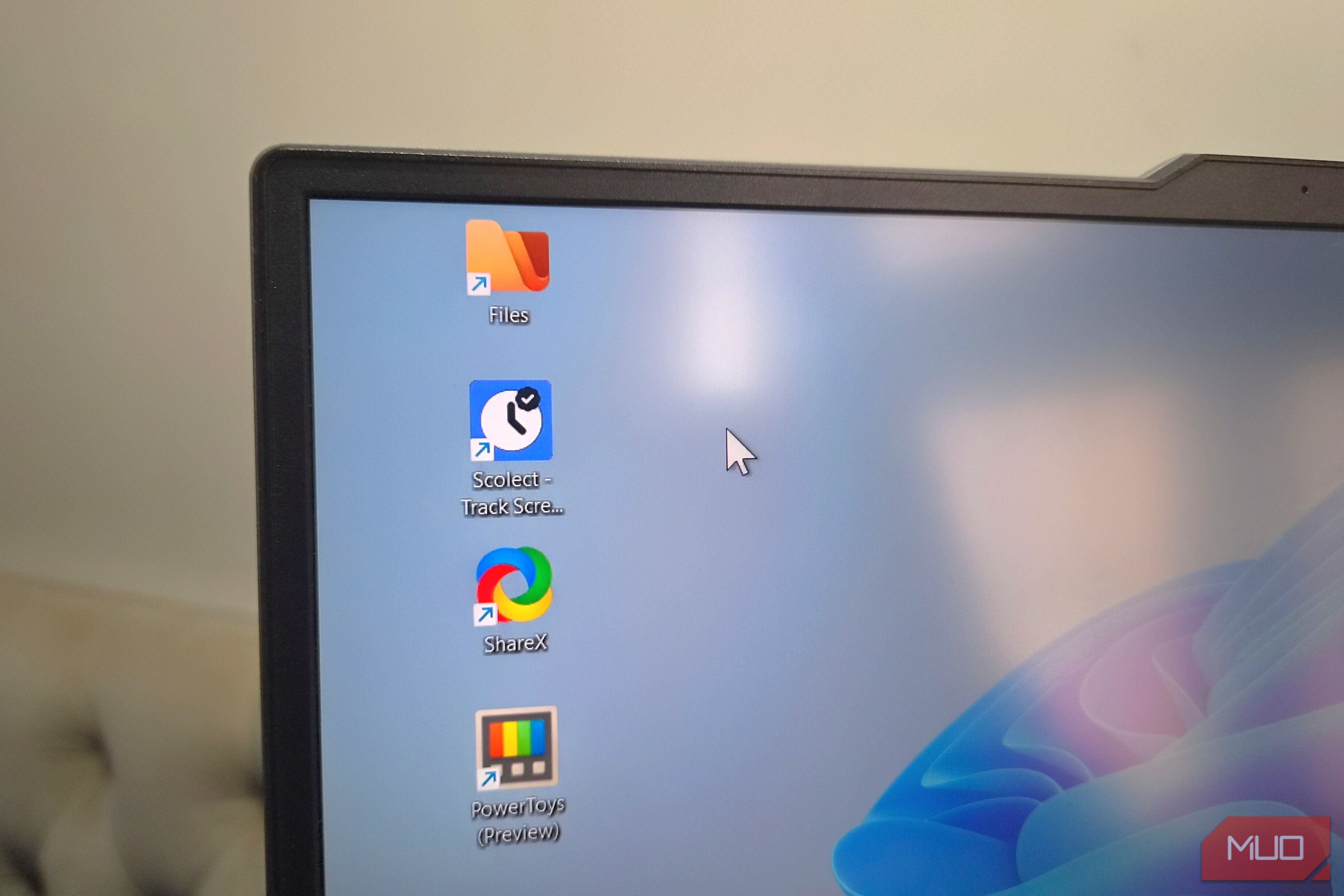
1. ShareX: The Swiss Army Knife of Screen Capture
ShareX stands out as an incredibly versatile screen capture and sharing utility. It's much more than just a screenshot tool; it's a comprehensive solution for visual content creation and sharing. Its extensive feature set makes it unparalleled on Windows, and its absence is keenly felt on Linux.
Why it's missed:
- Comprehensive Capture Options: Beyond standard screenshots, ShareX offers screen recordings, GIF creation, scrolling captures, and even Optical Character Recognition (OCR).
- Integrated Image Editor: Users can annotate, watermark, and modify screenshots directly within the app, eliminating the need to switch to another editor.
- Automatic Cloud Uploads: It supports a vast array of cloud platforms for instant sharing, a feature highly valued for efficiency.
- Utility Tools: Extra features like a QR code scanner and generator further cement its status as an all-in-one tool.
While Linux distributions have native screenshot tools and various third-party options, none combine the sheer breadth and depth of features offered by ShareX in a single, seamless package.
2. Scolect: Your Personal Productivity Tracker
For those working from home or simply keen on monitoring their digital habits, Scolect offers a robust solution for tracking application usage and enhancing productivity on Windows. Its intuitive design and comprehensive tracking capabilities are hard to find elsewhere.
Why it's missed:
- Offline Usage Tracking: Scolect runs silently in the background, logging app usage without requiring an internet connection.
- Intelligent Categorization: It automatically categorizes applications, providing an easy-to-digest overview of time spent.
- Visual Usage Patterns: Graphs illustrate usage trends over weeks or months, aiding in self-assessment.
- Productivity Features: Includes the ability to set time limits for specific applications and a built-in focus mode with Pomodoro timers.
Linux does have activity tracking apps, such as ActivityWatch, but the source suggests they often fall short of Scolect's combined feature set, user interface, and overall ease of use, leaving a gap for those accustomed to Scolect's capabilities.
3. PowerToys: A Rare Gift from Microsoft
PowerToys is a collection of utility tools developed by Microsoft itself, designed to enhance the Windows user experience with features that many feel should be native to the operating system. Its continuous development and the wide array of useful tools it offers make it an invaluable asset.
Why it's missed:
- Unified Utility Suite: It bundles multiple powerful features into one application, including PowerToys Run for launching apps and commands, Image Resizer, and PowerRename for batch file operations.
- Quality-of-Life Improvements: Features like the Power Display tool, spacebar previews, a color picker, OCR, and advanced window management significantly boost productivity.
- Customization: A built-in keyboard mapper allows users to remap keys and shortcuts to their preference.
- Constant Evolution: PowerToys regularly receives updates, introducing new features and improvements.
While individual Linux distributions or third-party applications might offer some of these functionalities, PowerToys integrates them into a cohesive, constantly evolving package that no single Linux alternative currently matches.
4. Files (Files App): The File Explorer Windows Should Have Had
The default File Explorer on Windows often leaves users wanting more, and the open-source Files app steps in as a sleek, feature-rich alternative that significantly upgrades the file management experience. Its modern design and advanced capabilities make it highly desirable.
Why it's missed:
- Enhanced Interface: Offers a superior aesthetic and user experience compared to the standard Windows File Explorer and many default Linux file managers.
- Advanced Views: Features like dual-pane view, column view, and tag support improve navigation and organization.
- Informative Status Bar: Provides real-time file transfer progress, a small but impactful detail.
- User-Friendly Additions: Displays folder sizes by default and provides customizable keyboard shortcuts, enhancing efficiency.
While Linux has numerous file managers, few, if any, offer the combination of aesthetic appeal and the robust feature set of the Files app. Although technically a paid app on the Microsoft Store, its installer is available for free directly from its website, making it accessible to many Windows users.
5. Notepad++: The Text Editor That Refuses to Be Replaced
Notepad++ has achieved legendary status among Windows users as a fast, lightweight, and incredibly versatile text editor. It surpasses the basic Notepad by leaps and bounds, offering features essential for developers, writers, and power users alike.
Why it's missed:
- Extensive Language Support: Provides syntax highlighting for over 80 programming languages, making it a go-to for coding.
- Powerful Editing Features: Includes multi-tab editing, robust find-and-replace with regex support, and split-screen editing.
- Macro Recording and Plugins: Allows users to automate tasks and extend functionality through a rich plugin ecosystem.
- Performance: Its speed and minimal resource usage are key advantages.
Linux boasts a wide array of text editors such as Gedit, Kate, and Mousepad. However, for those deeply accustomed to the specific workflow and comprehensive feature set of Notepad++, the transition to any single Linux alternative can be a challenging adjustment. While running it through compatibility layers like Wine might be an option, a native Linux version remains highly sought after.
Addressing the Gaps: What Linux Users Can Do
While these specific applications are Windows-only, the open-source nature of Linux means there are often excellent alternatives or combinations of tools that can replicate much of their functionality:
- Embrace Native Linux Tools: Many Linux distributions come with robust screenshot tools, text editors, and file managers. While they might not be direct feature-for-feature replacements, they are often well-integrated into the desktop environment.
- Explore Feature-Specific Alternatives: Look for individual Linux applications that specialize in one or two of the desired features. For example, a dedicated screenshot tool, a separate image editor, and a cloud synchronization client can collectively offer much of what ShareX provides.
- Consider Compatibility Layers: For some applications like Notepad++, compatibility layers such as Wine can allow you to run the Windows version on Linux. However, this may come with performance overheads or compatibility issues.
- Engage with the Open-Source Community: If you're passionate about a missing feature, consider contributing to existing open-source projects or initiating a discussion about developing a Linux equivalent.
Conclusion
The vibrant open-source ecosystem on Linux is vast and ever-growing, offering powerful tools for almost every need. Yet, the absence of these five particular applications — ShareX, Scolect, PowerToys, Files, and Notepad++ — highlights that even in the world of open source, some gems remain platform-specific. Understanding what makes these tools unique not only acknowledges their value but also informs discussions around future open-source development and cross-platform compatibility.
FAQ
Q: Are these tools truly open source if they are Windows-only?
A: Yes, the term "open source" refers to the availability of the source code, allowing anyone to view, modify, and distribute it. Whether an application is open source is independent of the operating systems it officially supports. The tools discussed here, like ShareX, PowerToys, Files, and Notepad++, do indeed have publicly available source code.
Q: Can I run these Windows tools on Linux using Wine or similar compatibility layers?
A: For some applications, particularly less graphically intensive ones like Notepad++, running them through compatibility layers such as Wine on Linux is often possible. However, the experience may not be as seamless as a native application, and more complex tools like PowerToys, which integrate deeply with the Windows operating system, are less likely to function correctly or fully through Wine.
Q: Why haven't these popular open-source tools been ported to Linux?
A: There isn't a single reason, but common factors include developer resources and priorities, reliance on specific Windows APIs (Application Programming Interfaces) that don't have direct Linux equivalents, and the effort required to re-architect or rewrite parts of the application for a new operating system. Sometimes, a lack of perceived demand within the developer community or among the tool's core users also plays a role.
Related articles

Ditch Merge & Center: The Better Way to Align Text in Excel
Learn to use Excel's "Center Across Selection" to align text across cells without merging, avoiding common data manipulation issues. This guide provides steps to utilize this newly accessible feature and add it to your Quick Access Toolbar.

AI's Confidence vs. Formal Methods' Rigor: Design Flaws & Verification
While AI accelerates code generation, formal methods remain critical for ensuring system correctness. Languages like TLA+ and tools like Quint enable developers to model and verify system designs before coding, catching subtle flaws. Quint makes formal methods more accessible with developer-friendly syntax and executability. This approach is vital for verifying AI-generated code through trace validation and model-based testing, ensuring reliability against real-world data.

Secure Internal API Access for AI Agents with MCP
AI agents accessing internal APIs directly pose significant risks, including identity loss, unrestricted queries, and security bypasses. The Model Context Protocol (MCP) offers a solution by defining explicit tools. A secure architecture involves an MCP server wrapping the API with strict input validation, coupled with a gateway that handles authentication, rate limiting, and audit logging, ensuring safe and accountable access.

Stop Android Auto Battery Drain: Essential Features to Disable and
Android Auto offers unparalleled convenience, bringing your phone's most useful features directly to your car's display. From navigation and calls to messages and music, it keeps you connected without distracting you
Beyond the Bugs: Conquering Studio Headaches in Indie Dev
This guide, part three in a series on running an indie studio, tackles the crucial but often overlooked aspect of dealing with non-development related issues. It introduces creating a shared 'studio backlog' for collective problems and using the IDS (Identify, Discuss, Solve) framework to address them constructively. The core message is to build powerful habits that keep studios from getting quietly derailed by lingering challenges.

Windows October Update: A Must-Have Security Overhaul
Microsoft's October 2026 Windows update delivers a critical security overhaul, patching over 1,400 vulnerabilities including two zero-days, one already exploited. It's essential for all users, especially with several Windows 11 versions reaching end of support.